
Best Alternative to Macrium Reflect for Free: Top Disk Cloning Tools
This article explores the top free and paid alternatives to Macrium Reflect for Windows users, providing practical options to help you choose the best system backup and disk cloning software.

By Irene Updated June 18, 2026


🌟 Quick Look:
Searching for the perfect Macrium Reflect alternative to protect your digital life? This guide breaks down the top five backup and disk cloning solutions available today to help you find the absolute right fit for your specific needs.
Here is a quick look at the featured software:
-
CBackup: Our top choice, seamlessly blending traditional system imaging, disk cloning, and powerful cloud backup into one incredibly user friendly platform.
-
Acronis Cyber Protect Home Office: A premium security suite that pairs robust full disk image backups with active artificial intelligence ransomware defense.
-
Veeam Agent for Microsoft Windows: A highly stable, enterprise grade option favored by IT professionals for rock solid local system recovery.
-
Paragon Hard Disk Manager: A comprehensive utility that wonderfully combines traditional data backups with advanced disk partitioning and drive migration tools.
-
Clonezilla: A completely free, open source, text based tool built specifically for technical users who need raw, high speed partition cloning.
Whether you prioritize cloud flexibility, advanced security, or pure performance, one of these excellent tools will keep your data perfectly safe.
Best 5 Macrium Reflect alternatives
Macrium Reflect has long been one of the most trusted disk imaging and backup solutions for Windows users. However, with the discontinuation of the free edition and increasing demand for cloud backup, flexible licensing, and easier management, many users are now searching for a reliable Macrium Reflect alternative.
When comparing Macrium Reflect competitors, users typically focus on several factors beyond basic backup functionality. Backup reliability, restore success rate, cloud integration, backup speed, ease of use, pricing, and long-term value often play a major role in the final decision.
After comparing the leading options available today, the following five solutions stand out as the best Macrium Reflect alternatives for home users, professionals, and small businesses. Here is a table to help you quickly understand the differences before reading the detailed reviews.
| Product | Suitable For | Highlights |
|---|---|---|
| 🏅CBackup | Most users | Backup, sync, cloud, diaster recovery |
| Acronis | Security focused users | Backup plus ransomware protection |
| Veeam | IT professionals | Enterprise grade reliability |
| Paragon | Power users | Backup and disk management |
| Clonezilla | Advanced users | Free and powerful disk imaging |
🌟 Top 1. CBackup
Best For
Users seeking a complete backup solution that combines system imaging, cloud backup, synchronization, and disaster recovery in a single platform.
💬 Review and Comments
CBackup ranks as the best overall Macrium Reflect alternative because it successfully bridges the gap between traditional backup software and modern cloud based data protection. While many backup tools continue focusing primarily on local disk imaging, CBackup expands its capabilities by integrating cloud backup, cloud management, file synchronization, and system recovery into one user friendly platform.
One of the most noticeable advantages is its accessibility. Users migrating from Macrium Reflect often appreciate how simple it is to configure backup jobs, schedule automatic protection, and restore files when needed. The software avoids overwhelming users with complicated technical settings while still offering advanced capabilities for experienced users.
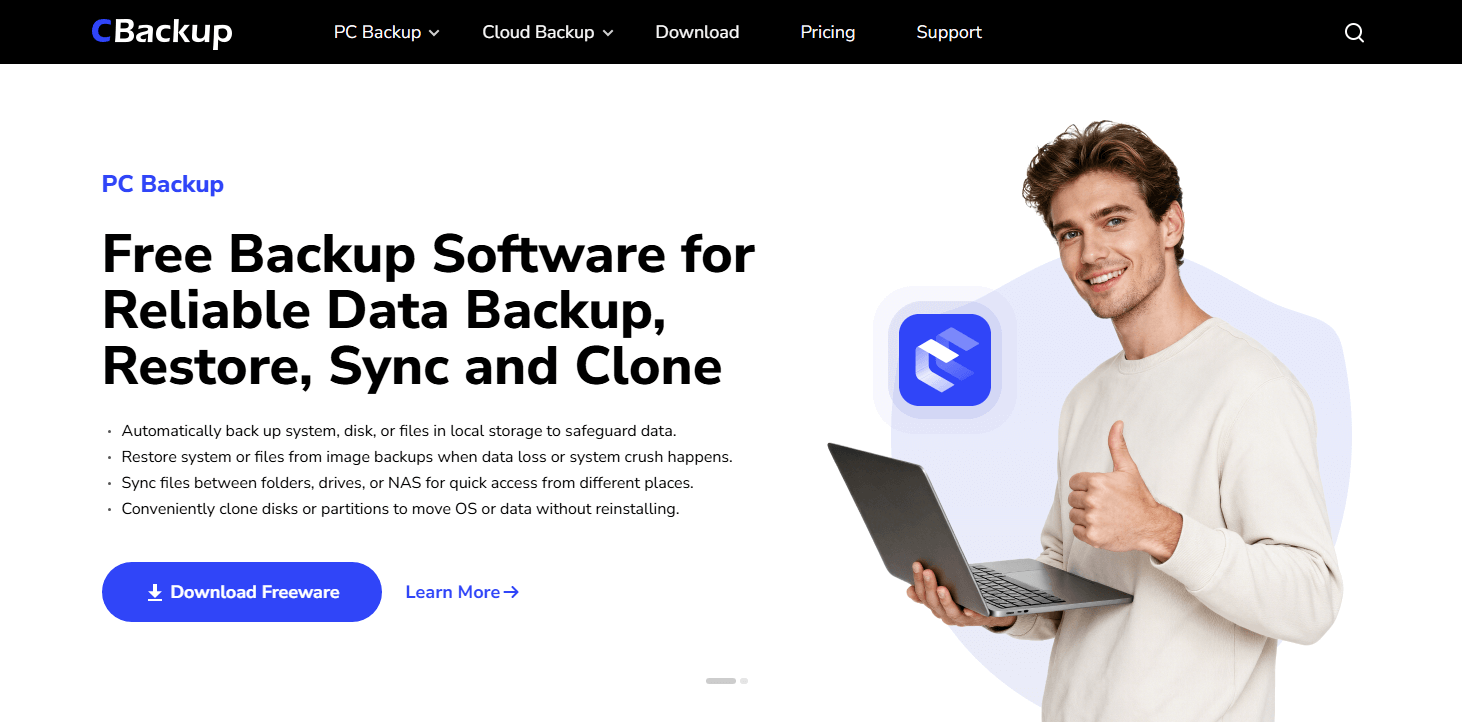
Another area where CBackup shines is cloud integration. Many competitors require additional software or separate cloud management tools. CBackup allows users to manage local and cloud backups from the same interface. For users adopting a hybrid backup strategy, this can significantly simplify daily management.
Recovery capabilities are equally impressive. The software supports complete system backup, disk backup, partition backup, and file backup. In the event of system corruption, hardware failure, or accidental deletion, users can restore their systems with minimal downtime.
For individuals and businesses looking for a modern replacement for Macrium Reflect, CBackup delivers one of the most balanced solutions currently available. It combines strong backup technology, cloud flexibility, straightforward management, and reliable recovery without introducing unnecessary complexity.
📊 CBackup Key Information
| Factor | Details |
|---|---|
| Backup Types | System, Disk, Partition, File |
| Disk Imaging | Yes |
| Cloud Backup | Yes |
| Real Time Sync | Yes |
| Universal Restore | Yes |
| Backup Speed | Fast |
| Recovery Reliability | Excellent |
| Resource Usage | Low |
| Ease of Use | Very Easy |
| Encryption | AES 256 Bit |
| Free Version | Yes |
| Starting Price | Free |
🔑 Key Features
-
System Backup
-
Disk Backup
-
Partition Backup
-
File Backup
-
Scheduled Backup
-
Cloud Sync
-
Real Time Sync
-
File Synchronization
-
Universal Restore
🌟 Exclusive Features
-
Event Triggered Backup
-
USB Plugged In Backup
-
Portable Version Creator
-
Disk Clone
-
Partition Clone
-
Email Backup
-
Outlook Backup
👍 Pros
-
Very beginner friendly
-
Strong cloud backup integration
-
Reliable recovery performance
-
Flexible automation options
-
Free version available
-
Lightweight resource usage
👎 Cons
-
Fewer enterprise management tools than Veeam
-
Limited Linux support
💰 Pricing
-
Free Plan Available
-
Paid plans available for advanced features
🌟 Top 2. Acronis Cyber Protect Home Office
Best For
Users who want backup software combined with cybersecurity protection.
💬 Review and Comments
Acronis Cyber Protect Home Office is often regarded as one of the most feature rich backup platforms available today. Unlike traditional backup applications that focus solely on backup and recovery, Acronis combines system protection, cloud backup, ransomware defense, and disk imaging into a unified ecosystem.
The biggest reason many users choose Acronis over other Macrium Reflect competitors is security. Cyber threats continue growing each year, and many users looking for the best Macrium Reflect alternative want their backup software to actively help defend their systems. Acronis addresses this need through built in ransomware monitoring and malware protection technologies.
.png)
From a backup perspective, Acronis remains extremely capable. Full system imaging, disk cloning, incremental backups, and cloud backup support are all available. The software also offers excellent recovery options, allowing users to restore entire systems or individual files.
One area where Acronis receives mixed feedback is pricing. While its feature set is impressive, subscription costs are higher than many competing solutions, including some Macrium Reflect free alternatives. Some users may also find the interface slightly overwhelming due to the large number of integrated features.
Despite these considerations, Acronis remains one of the most complete Macrium Reflect alternatives available, especially for users prioritizing both backup and security.
📊 Acronis Key Information
| Factor | Details |
|---|---|
| Backup Types | System, Disk, File |
| Disk Imaging | Yes |
| Cloud Backup | Yes |
| Ransomware Protection | Yes |
| Universal Restore | Yes |
| Backup Speed | Excellent |
| Recovery Reliability | Excellent |
| Resource Usage | Moderate |
| Ease of Use | Easy |
| Security Features | Advanced |
| Free Version | Trial |
| Starting Price | Subscription Based |
🔑 Key Features
-
Full System Imaging
-
Disk Cloning
-
Cloud Backup
-
Incremental Backup
-
Recovery Media
-
Mobile Device Backup
🌟 Exclusive Features
-
AI Powered Ransomware Protection
-
Malware Scanning
-
Blockchain Verification
-
Microsoft 365 Backup
👍 Pros
-
Excellent security features
-
Strong recovery capabilities
-
Fast imaging performance
-
Cloud storage integration
👎 Cons
-
Higher pricing
-
Subscription model
-
More complex interface
💰 Pricing
-
Annual subscription plans available
🌟 Top 3. Veeam Agent for Microsoft Windows
Best For
IT professionals and advanced users seeking enterprise grade backup technology.
💬 Review and Comments
Veeam has earned a reputation as one of the most trusted names in enterprise backup. While many users associate Veeam with large organizations, its Windows Agent provides powerful backup capabilities for individual systems as well.
Former Macrium Reflect users often choose Veeam because of its outstanding reliability. The backup engine is highly mature and supports system level backups, volume backups, file backups, and bare metal recovery, making it a strong Macrium Reflect workstation alternative for business and professional users.

Veeam also performs exceptionally well when handling larger environments. Users managing multiple devices appreciate its scalability and advanced backup validation features. Backup verification helps ensure that recovery points remain usable when they are actually needed, making it one of the leading Macrium Reflect server alternatives.
The primary downside is complexity. Compared with CBackup or Macrium Reflect, Veeam has a steeper learning curve. Many advanced settings appeal to IT administrators but may feel intimidating for casual home users.
Nevertheless, for users who prioritize reliability above all else, Veeam remains one of the strongest Macrium Reflect alternatives available.
📊 Veeam Key Information
| Factor | Details |
|---|---|
| Backup Types | System, Volume, File |
| Disk Imaging | Yes |
| Bare Metal Recovery | Yes |
| Backup Verification | Yes |
| Enterprise Integration | Yes |
| Backup Speed | Excellent |
| Recovery Reliability | Outstanding |
| Resource Usage | Low |
| Ease of Use | Moderate |
| Scalability | Excellent |
| Free Version | Yes |
| Starting Price | Free |
🔑 Key Features
-
System Backup
-
Volume Backup
-
File Backup
-
Bare Metal Recovery
-
Backup Verification
-
Recovery Media
🌟 Exclusive Features
-
Immutable Backups
-
Enterprise Grade Backup Engine
-
Virtual Machine Integration
-
Application Aware Processing
👍 Pros
-
Extremely reliable
-
Powerful free version
-
Enterprise level technology
-
Excellent recovery success rate
👎 Cons
-
More technical interface
-
Learning curve for beginners
-
Some features target businesses
💰 Pricing
-
Free Edition Available
-
Commercial licenses available
🌟 Top 4. Paragon Hard Disk Manager
Best For
Users who want backup, imaging, partition management, and disk migration tools in one package.
💬 Review and Comments
Paragon Hard Disk Manager offers far more than traditional backup software. It combines imaging, backup, cloning, partition management, disk migration, and recovery capabilities within a single application.
Many Macrium Reflect users appreciate Paragon because it provides both backup protection and advanced disk management functionality. As one of the Macrium backup and restore alternatives, it allows users to manage storage, migrate operating systems, and create system images from a single interface instead of relying on separate partitioning software.
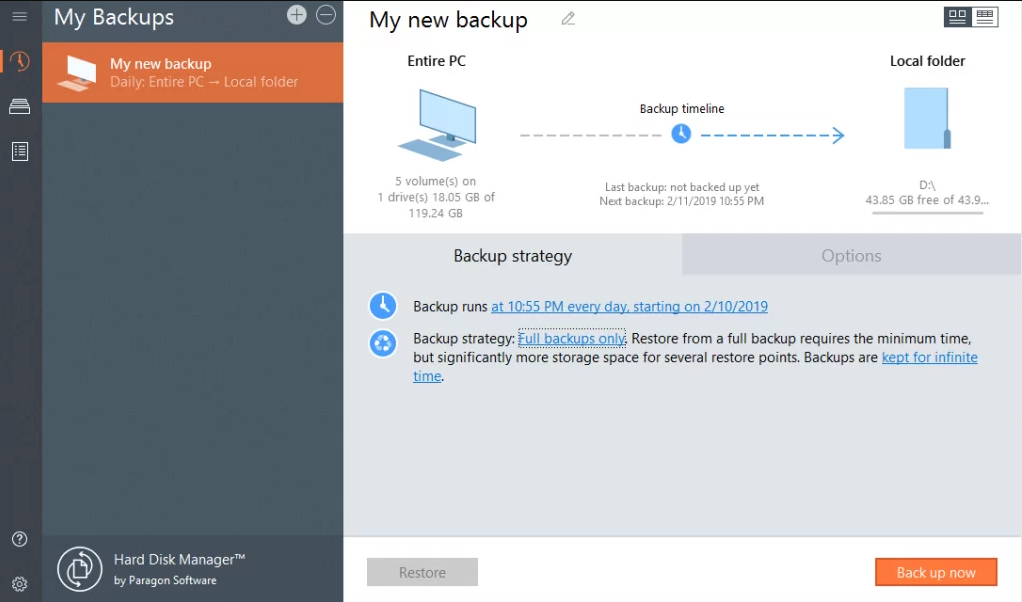
The software performs well during backup and recovery operations. It also includes helpful tools for SSD migration and hardware upgrades, making it attractive for power users and PC enthusiasts.
Although the interface is more feature rich than some alternatives, Paragon remains approachable for most users willing to spend a little time learning the available functions, making it one of the Macrium Reflect competitors worth considering.
📊 Paragon Key Information
| Factor | Details |
|---|---|
| Backup Types | System, Disk, File |
| Disk Imaging | Yes |
| Disk Cloning | Yes |
| Partition Management | Yes |
| OS Migration | Yes |
| Backup Speed | Good |
| Recovery Reliability | Excellent |
| Resource Usage | Moderate |
| Ease of Use | Moderate |
| Licensing | Perpetual |
| Free Version | Trial |
| Starting Price | One Time Purchase |
🔑 Key Features
-
System Backup
-
Disk Imaging
-
Disk Cloning
-
Partition Management
-
OS Migration
-
Recovery Media
🌟 Exclusive Features
-
Advanced Partition Management
-
Secure Disk Wiping
-
SSD Migration Tools
-
Sector Level Imaging
👍 Pros
-
Backup and partitioning combined
-
Reliable imaging engine
-
One time purchase option
-
Excellent migration tools
👎 Cons
-
Interface can feel busy
-
More features than some users need
💰 Pricing
-
One time license available
🌟 Top 5. Clonezilla
Best For
Experienced users who prioritize powerful imaging and cloning capabilities without spending money.
💬 Review and Comments
Clonezilla has remained a favorite among IT professionals for many years. Unlike most commercial backup applications, Clonezilla is completely free and open source.
Its biggest strength is raw imaging performance. Clonezilla focuses on creating and restoring disk images as efficiently as possible. Because it runs outside the Windows environment, it often achieves impressive backup and restoration speeds, making it a popular alternative to Macrium Reflect.
The software supports a wide range of file systems and operating systems. It is also capable of large-scale deployments, making it popular in educational institutions and enterprise environments.

The trade off is usability. Clonezilla uses a text based interface that can appear intimidating to beginners. While experienced users often appreciate the flexibility, casual users may prefer a more visual solution such as CBackup or Acronis.
For technical users who value performance, flexibility, and cost effectiveness, Clonezilla remains one of the most respected Macrium Reflect competitors available today.
| Factor | Details |
|---|---|
| Backup Types | Disk and Partition Imaging |
| Disk Imaging | Yes |
| Open Source | Yes |
| Multicast Cloning | Yes |
| Backup Speed | Excellent |
| Recovery Reliability | Excellent |
| Resource Usage | Very Low |
| Ease of Use | Difficult |
| Multi OS Support | Yes |
| Free Version | Yes |
| Licensing | Open Source |
| Starting Price | Free |
🔑 Key Features
-
Disk Imaging
-
Partition Imaging
-
Multicast Cloning
-
Live USB Operation
-
Multi Platform Support
🌟 Exclusive Features
-
Open Source Platform
-
Network Based Mass Deployment
-
Advanced Scripting
-
Broad File System Support
👍 Pros
-
Completely free
-
Extremely powerful imaging engine
-
Supports many operating systems
-
Excellent deployment capabilities
👎 Cons
-
Not beginner friendly
-
Text based interface
-
No integrated cloud backup
💰 Pricing
-
Completely Free
Why do users seek alternatives to Macrium Reflect?
Macrium Reflect earned a strong reputation for dependable disk imaging, system cloning, and full system backup. For years, its free edition was one of the most popular choices among Windows users who wanted a reliable way to protect their systems without paying for premium software.
However, user expectations have changed. Many people now want more than basic imaging tools. Cloud backup, automatic scheduling, stronger security, simpler management, and flexible pricing have become major decision factors. The discontinuation of Macrium Reflect Free also pushed many long-time users to explore other options. Here is a table to help you better understand why do users seek Macrium Reflect alternative for Windows systems.
|
Reason |
Why it matters |
|---|---|
|
Free version discontinued |
Users lost access to one of the best free imaging tools and began searching for replacements. |
|
Lack of built-in cloud backup |
Modern users often want offsite protection and easier cloud integration. |
|
Limited automation in older free editions |
Automatic scheduled backups are important for ongoing data protection. |
|
No built-in encryption in the free edition |
Encrypted backups are increasingly expected for privacy and security. |
|
Desire for simpler interfaces |
Some alternatives offer more modern and beginner friendly experiences. |
|
Need for broader features |
Users may want sync tools, cloud management, ransomware protection, or easier recovery workflows. |
|
Pricing and licensing concerns |
Subscription costs or premium only features can push users toward more flexible alternatives. |
📢 Key reasons in more detail:
1. The free edition was discontinued
Macrium Reflect Free was widely regarded as one of the best free disk imaging tools available. Once development stopped, many users began looking for software that could continue receiving updates, security fixes, and compatibility improvements.
2. Users want encrypted backups
The free edition did not include built in AES encryption for backup images. For people storing backups on external drives or cloud storage, encryption is an important layer of protection against unauthorized access.
3. Automatic scheduling matters
Manual backups are easy to forget. Many users prefer software that can run backups daily, weekly, or automatically in the background so protection remains consistent without extra effort.
4. Cloud backup is increasingly important
Local backups are useful, but they do not protect against theft, fire, or drive failure affecting all local copies. Alternatives with built in cloud backup or cloud management are attractive to users adopting hybrid backup strategies.
5. Users want more modern features
Competitors now offer capabilities such as real time synchronization, ransomware protection, cloud to cloud transfer, backup verification, and easier disaster recovery workflows. These features can make backup management more convenient and secure.
6. Pricing and licensing influence decisions
Some users prefer one time purchases, while others want strong free plans or lower subscription costs. When premium features become necessary, users often compare overall value against competing products.
Macrium Reflect is still respected for its imaging reliability, but many users now expect backup software to provide more than traditional disk cloning and recovery. Cloud integration, automation, encryption, modern usability, and flexible pricing have become major priorities. That is why tools such as CBackup, Acronis, Veeam, Paragon, and Clonezilla are increasingly discussed as strong Macrium Reflect alternatives.
How to use the best Macrium Reflect for disk cloning?
If you are looking for a reliable Macrium Reflect alternative for disk cloning, CBackup offers an easy way to transfer everything from one drive to another, including the operating system, applications, settings, and personal files. It can be useful when upgrading to a larger hard drive, replacing an old disk, or migrating from an HDD to an SSD.
Before starting, install CBackup on your Windows computer and connect the destination drive. Make sure the target disk has enough available space to hold all data from the source disk.
Note: System disk cloning only is also available in CBackup.
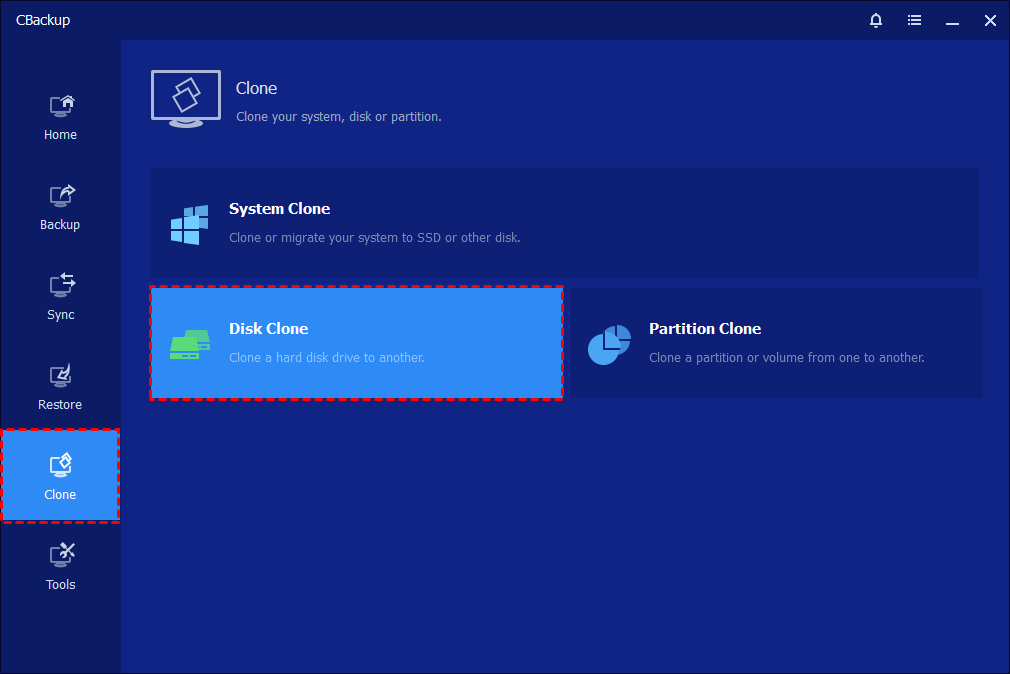
Step 1. Open CBackup, click Clone from the left panel, and select Disk Clone.
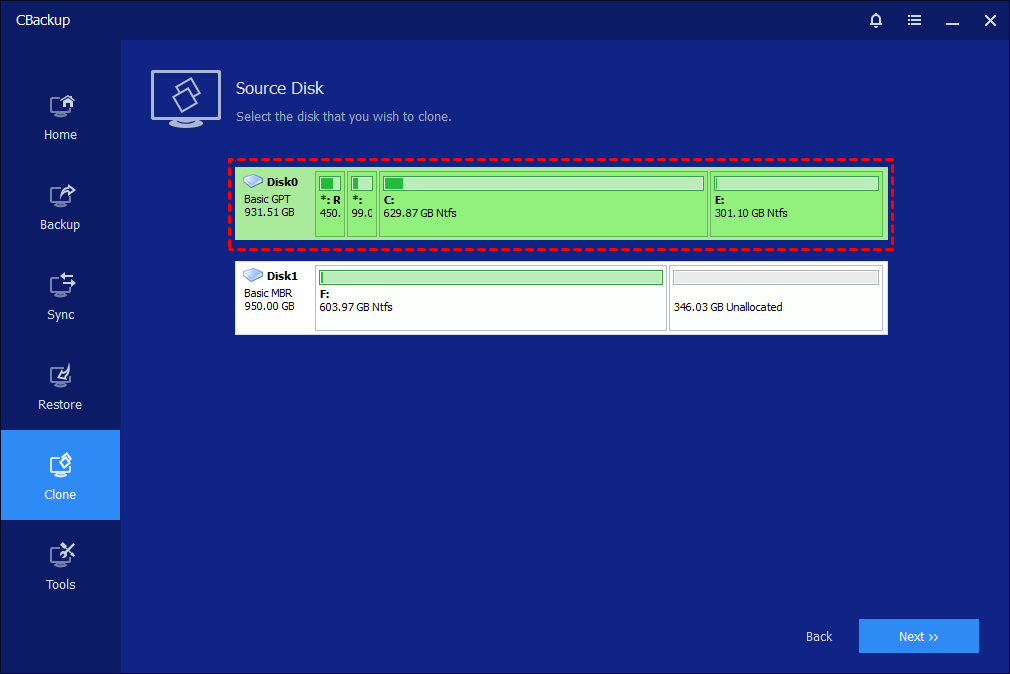
Step 2. Choose the source disk you want to clone and click Next.
Step 3. Select the destination disk that will receive the cloned data and click Next.
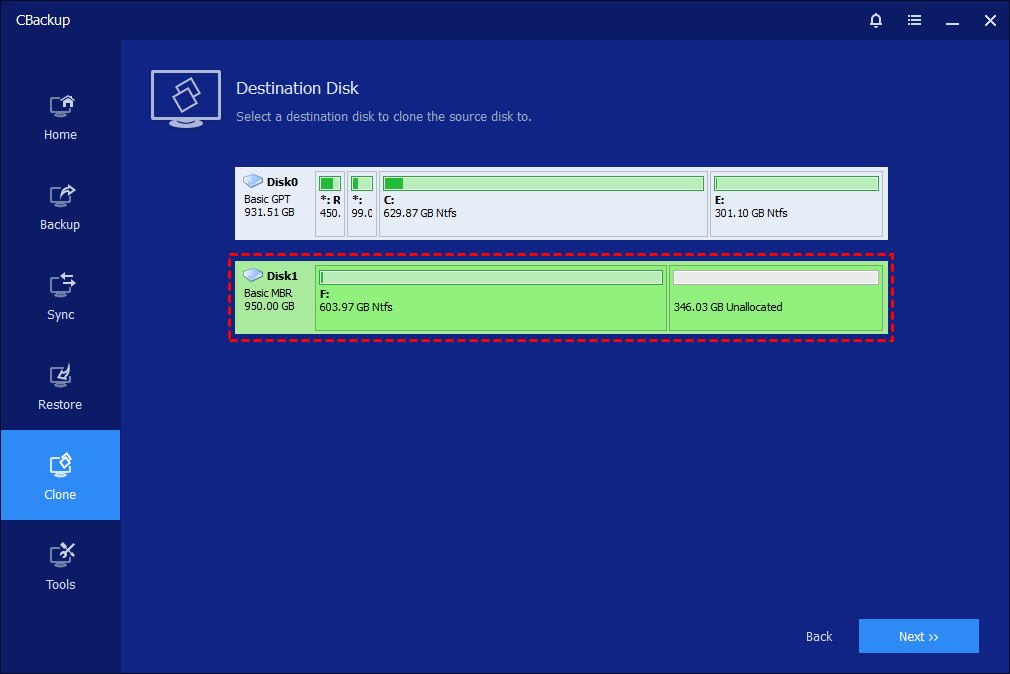
🌟 Important: All existing data on the destination disk will be erased. Back up important files before proceeding.
Step 4. Review the source and destination disk information. If necessary, configure additional clone options.
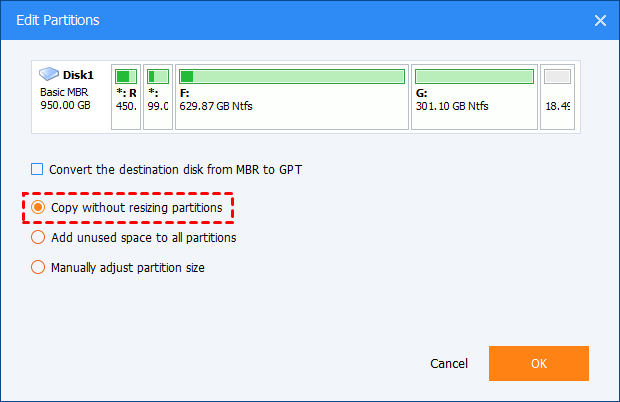
🔶 If the source and destination disks use different partition styles, you can convert the target disk between MBR and GPT to ensure proper bootability after cloning.
🔶You can also enable Sector by Sector Clone to copy every sector from the source disk. The destination disk must be equal to or larger than the source disk.
🔶If you are cloning to an SSD, enable SSD Alignment to improve SSD performance and optimize read and write operations.
Step 5. Click Start Clone and wait for the cloning process to complete. When finished, click Finish.
- ★ Notes:
- To boot successfully from the cloned drive, install the destination disk internally when possible, set it as the primary boot device, and adjust the BIOS or UEFI boot mode if the source and destination disks use different partition styles such as MBR and GPT.
- If the destination disk is occupied by another application, CBackup may require a system restart to perform the cloning operation in Restart Mode. The total cloning time may vary depending on disk size, connection type, drive condition, and overall system performance.
- Sector by Sector Clone is automatically used for encrypted disks and certain non NTFS or FAT32 partitions. When this mode is enabled, the Edit Partitions option becomes unavailable. In addition, Disk Clone does not support dynamic disks. If you need to clone a dynamic disk, use System Clone or Partition Clone instead.
As one of the best Macrium Reflect alternatives, CBackup makes disk cloning simple and dependable. Whether you are upgrading to a larger drive, migrating your system to an SSD, or replacing an old disk, it offers an efficient solution for transferring your operating system and data while preserving bootability and overall performance.
Final verdict
If you are searching for the best Macrium Reflect alternative overall, CBackup stands out thanks to its combination of system backup, disk imaging, cloud backup, synchronization, recovery tools, and ease of use. It delivers the most balanced experience for both beginners and experienced users.
For users focused on security, Acronis Cyber Protect Home Office is a strong choice. Veeam Agent excels in enterprise grade reliability, Paragon Hard Disk Manager is ideal for advanced disk management tasks, and Clonezilla remains an excellent free solution for technical users who prioritize imaging performance and flexibility.
FAQs
1. What is the best Macrium Reflect alternative for Windows users?
The best Macrium Reflect alternative depends on your specific needs. If you want a balance of system backup, disk imaging, cloud backup, and ease of use, CBackup is a strong choice. Other popular options include Acronis Cyber Protect Home Office, Veeam Agent for Microsoft Windows, Paragon Hard Disk Manager, and Clonezilla.
2. Is there a free alternative to Macrium Reflect Free?
Yes. Several backup solutions offer free editions or completely free versions. CBackup provides a free version for backup and synchronization tasks, while Veeam Agent for Microsoft Windows and Clonezilla are also widely used free alternatives. The right choice depends on whether you need simple backups, full disk imaging, or advanced recovery features.
3. Can a Macrium Reflect alternative clone a hard drive and transfer Windows to an SSD?
Yes. Most leading Macrium Reflect alternatives support disk cloning and operating system migration. Tools such as CBackup, Acronis Cyber Protect Home Office, Paragon Hard Disk Manager, and Clonezilla can help transfer Windows, applications, and files from an HDD to an SSD without reinstalling the operating system.
4. Which Macrium Reflect alternative offers cloud backup support?
Not all disk imaging tools include cloud backup capabilities. If cloud protection is important, solutions such as CBackup and Acronis Cyber Protect Home Office provide built in cloud backup features, allowing users to store backup copies offsite for additional security and disaster recovery protection.
5. What should I look for when choosing an alternative to Macrium Reflect?
When comparing Macrium Reflect alternative Windows solutions, consider backup reliability, recovery success rate, disk imaging capabilities, cloning features, cloud backup support, ease of use, scheduling options, encryption, and pricing. Choosing software that matches your backup strategy and technical skill level can help ensure long term data protection.
Free Get CBackup Now

Secure & Free