

6 Free GoodSync Alternative Options for Secure Automated Backups
If you're searching for a GoodSync alternative, this guide reviews the best free and paid file sync software available. Compare leading tools for automatic file synchronization, cross-device syncing, and efficient data management.

By Irene Updated June 18, 2026


📢 Quick Overview of the best GoodSync alternatives
Choosing the right GoodSync alternative depends on whether you prioritize file synchronization, backup protection, cloud compatibility, privacy, or automation. Some solutions focus on keeping files synchronized across devices, while others provide advanced backup and disaster recovery features. The following tools represent some of the most reliable alternatives available today, offering options for both personal and business users.
| Software | Overview |
|---|---|
| CBackup | A comprehensive backup focused solution that combines file backup, system imaging, disk protection, and automated scheduling. Ideal for users who want stronger data protection and recovery capabilities. |
| FreeFileSync | A free and open source synchronization tool designed for local drives, NAS devices, and network folders. Known for fast performance and transparent synchronization management. |
| Resilio Sync | A peer to peer synchronization platform that transfers files directly between devices without relying on cloud storage. Popular for large file transfers and high speed syncing. |
| Syncthing | An open source synchronization solution that emphasizes privacy, security, and complete user control. Suitable for users who prefer decentralized file synchronization. |
| Duplicati | A secure backup application with encryption, compression, and cloud storage support. Best suited for long term backup and disaster recovery strategies. |
| Rclone | A powerful command line tool for cloud synchronization, migration, and storage management. Widely used by IT professionals and advanced users for automation. |
Each solution offers distinct advantages depending on your workflow and requirements. In the sections below, we examine their features, strengths, limitations, pricing, and ideal use cases to help you identify the best GoodSync alternative for your needs.
Top 6 GoodSync alternatives review
For years, GoodSync has been a popular choice for file synchronization and backup. However, some users find its pricing expensive, while others want simpler software, stronger backup capabilities, open source options, or more flexible automation. As a result, many people are searching for a dependable GoodSync alternative that better fits their needs.
The good news is that there are several excellent alternatives available today. Some focus on synchronization, some specialize in backup and disaster recovery, and others provide advanced automation for professional environments.
In this guide, we review the best 6 GoodSync alternatives available. Whether you need a free GoodSync alternative or a premium solution with advanced features, this list can help you find the right software.
While all six tools are capable alternatives to GoodSync, they serve different audiences. Let's take a closer look.
1. CBackup
🌟 Review & User Comments
CBackup has become a popular choice among users who need more than basic file synchronization. Unlike traditional sync tools, it focuses on protecting files, disks, and Windows systems through comprehensive backup and recovery features.
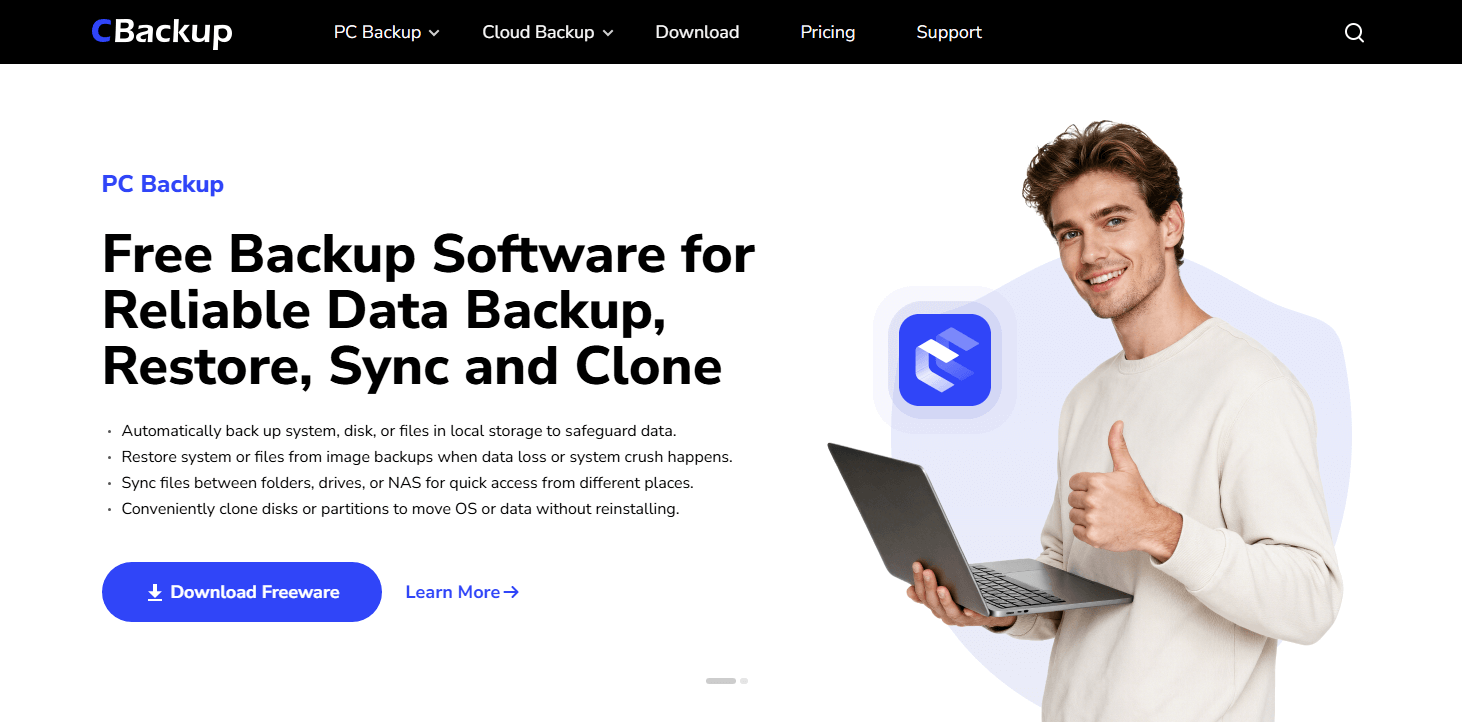
Users often praise its straightforward interface and simple setup process. Creating file backups, disk images, or system backups requires minimal technical knowledge, making it suitable for both beginners and experienced users. Many also appreciate the automated scheduling options, which help keep important data protected without requiring constant manual intervention.
🌟 Features, Pros & Pricing
| Category | Details |
|---|---|
| Key Features |
File Backup System Backup Partition Backup Incremental Backup Differential Backup |
| Exclusive Features |
One Click System Backup Full Disk Imaging Flexible Backup Scheduling |
| Pros |
Easy to use, Reliable backup automation Strong recovery capabilities Beginner-friendly interface Free version available |
| Cons |
Not primarily designed for advanced file synchronization Limited collaboration features |
| Security |
Secure backup processes Data protection through image-based and file-based backup strategies |
| Platform Support | Windows |
| Best For |
Home users Small businesses Windows users Disaster recovery planning |
| Free Version | Yes |
| Pricing | Free version available, Premium editions available |
For users seeking a practical free GoodSync alternative, CBackup focuses on data protection and recovery rather than simple file synchronization. It supports file, partition, disk, and system backups, allowing flexible protection for different needs. Automatic daily, weekly, or monthly schedules help keep data safe with minimal effort. Incremental and differential backups save storage space and reduce backup time by copying only changed data. With a clear interface and straightforward recovery options, CBackup is easy to use for both individuals and businesses. It is a reliable choice for users who value backup security, automation, and disaster recovery.
2. FreeFileSync
🌟 Review & User Comments
FreeFileSync has built a strong reputation among users who need reliable folder synchronization without spending money. As one of the most popular open source solutions available today, it is often recommended as a GoodSync alternative free option for local file management.
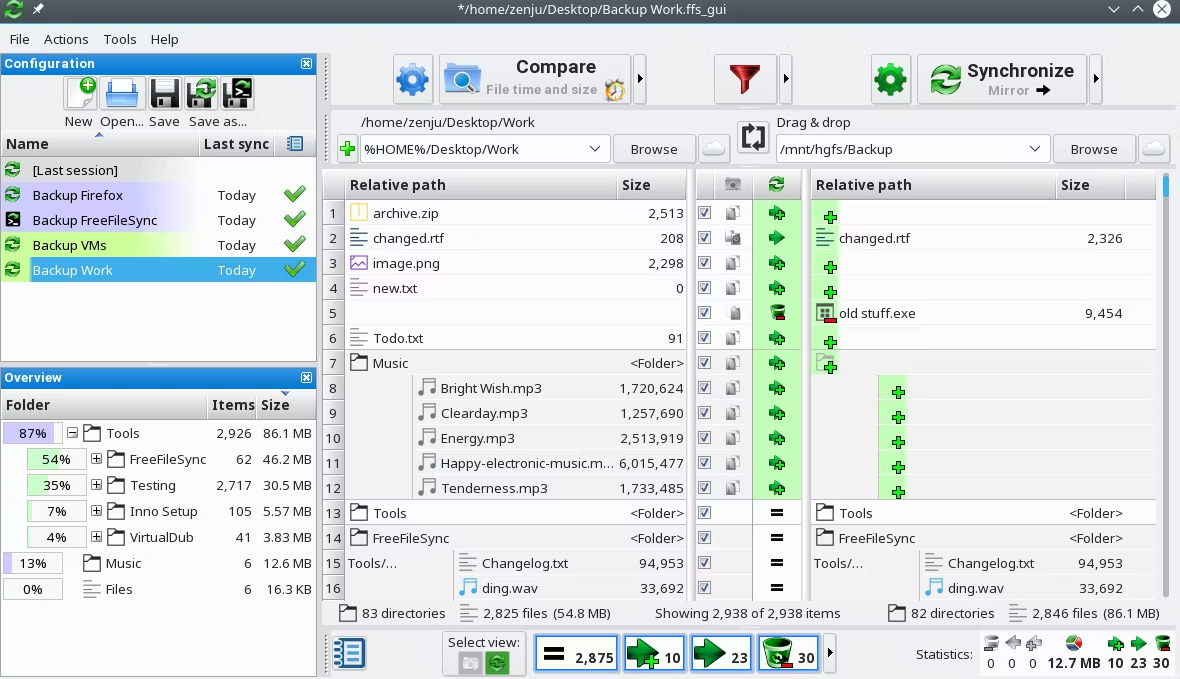
Users consistently praise FreeFileSync for its speed and transparency. Before executing any synchronization task, the software clearly displays all planned file operations, allowing users to review changes before proceeding. This level of control reduces the risk of accidental deletions and makes the synchronization process more predictable.
🌟 Features, Pros & Pricing
| Category | Details |
|---|---|
| Key Features |
Two Way Sync Mirror Sync Batch Processing Network Sync Version Tracking |
| Exclusive Features |
RealTimeSync Monitoring Intelligent File Move Detection Binary File Comparison |
| Pros |
Completely free, Fast synchronization Open source Cross-platform support |
| Cons |
Outdated interface Limited cloud capabilities |
| Security | Supports SFTP and FTPS secure transfers |
| Platform Support | Windows, macOS, Linux |
| Best For | Local drives, NAS devices, External storage |
| Free Version | Yes |
| Pricing | Free, Optional Donation Edition |
FreeFileSync is ideal for users who need powerful synchronization capabilities without paying subscription fees. It focuses entirely on performance, reliability, and transparency. If your workflow involves external hard drives, NAS systems, or local network shares, FreeFileSync provides one of the strongest alternatives to GoodSync while remaining completely free. Its open source nature also appeals to users who prefer community-driven software over commercial solutions.
3. Resilio Sync
🌟 Review & User Comments
Resilio Sync takes a very different approach compared to traditional synchronization software. Instead of relying on cloud servers, it uses peer to peer technology to transfer files directly between devices. This unique architecture makes it one of the most innovative GoodSync alternatives available today.
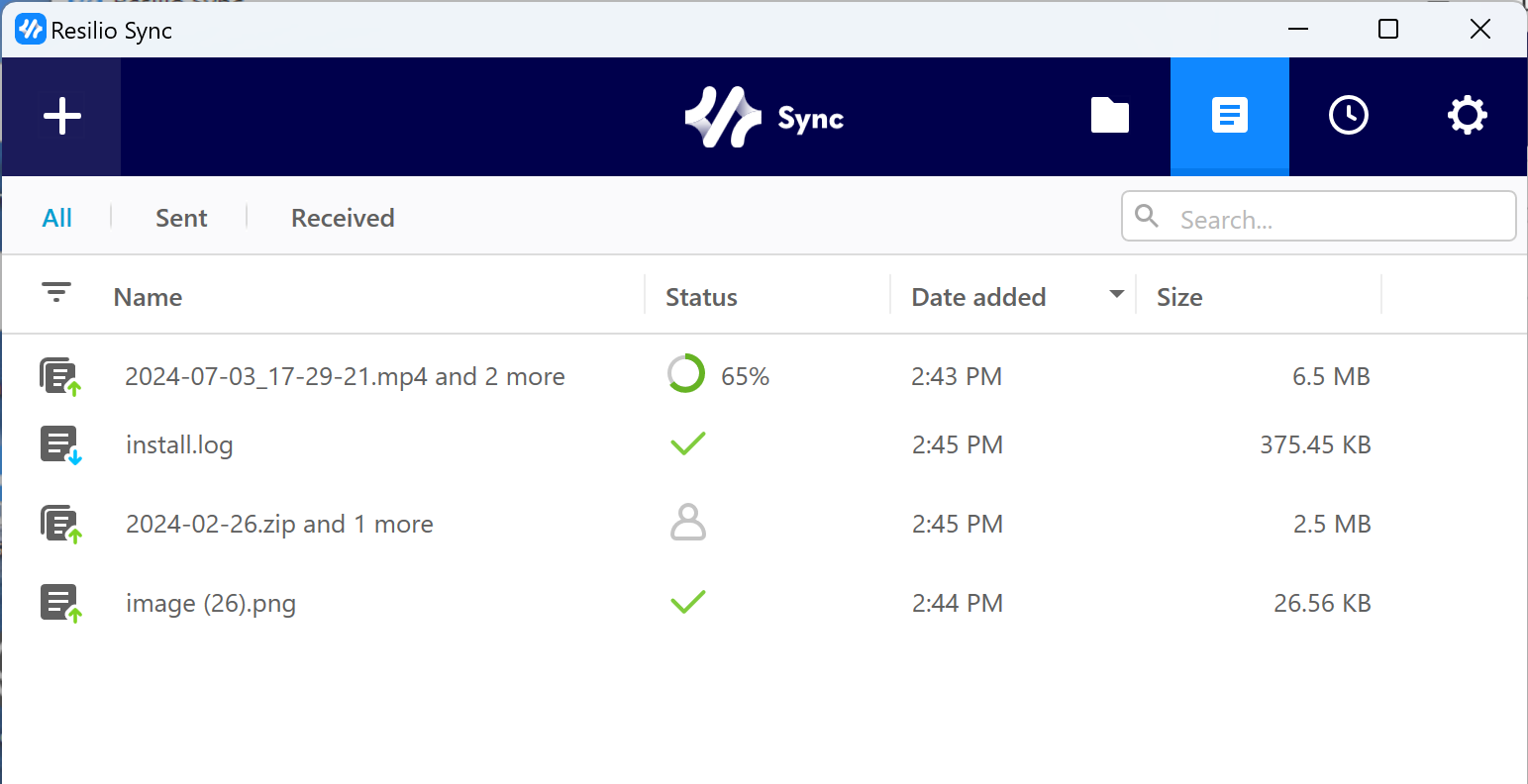
Users frequently highlight its impressive transfer speeds, especially when working with large video projects, photo libraries, or extensive document collections. Because files move directly between devices, transfer performance often exceeds traditional cloud-based solutions.
🌟 Features, Pros & Pricing
| Category | Details |
|---|---|
| Key Features |
Peer to Peer Sync Real Time Sync Mobile Sync LAN Optimization |
| Exclusive Features |
BitTorrent-Based Architecture Selective Sync Direct Device Communication |
| Pros |
Extremely fast No cloud storage fees High privacy Unlimited storage potential |
| Cons | Devices must be online for direct transfers |
| Security | AES 256-bit encryption |
| Platform Support | Windows, macOS, Linux, Android, iOS |
| Best For | Large files, Media professionals, Privacy-focused users |
| Free Version | Yes |
| Pricing | Free basic version, Lifetime license available |
Resilio Sync is perfect for users who prefer to maintain full control over their data without relying on third party cloud providers. The software excels at transferring large files efficiently and securely between multiple devices. If privacy, speed, and independence from cloud storage are important priorities, ResilioSyncthing Sync is among the most compelling GoodSync alternative free solutions available.
4. Syncthing
🌟 Review & User Comments
Syncthing has become one of the most respected open source synchronization tools in the technology community. It provides secure peer to peer synchronization without requiring users to trust any centralized service provider.

Users particularly appreciate the transparency of the project. Every line of code is publicly available for review, making it a trusted choice for privacy-conscious individuals and organizations.
🌟 Features, Pros & Pricing
| Category | Details |
|---|---|
| Key Features |
Device Sync Folder Sharing File Versioning Continuous Synchronization |
| Exclusive Features |
Cluster-Based Synchronization Open Source Transparency Cryptographic Device IDs |
| Pros |
Completely free Strong privacy protection Active community support |
| Cons | Slight learning curve for beginners |
| Security | TLS encryption with Forward Secrecy |
| Platform Support | Windows, macOS, Linux, Android |
| Best For | Privacy-focused users, IT enthusiasts, Home labs |
| Free Version | Yes |
| Pricing | Completely free |
Syncthing is an excellent option for users who prioritize privacy and open source software. Unlike many commercial solutions, there are no subscription fees, locked features, or vendor dependencies. As one of the most trusted GoodSync alternatives, Syncthing delivers secure and reliable synchronization while giving users complete ownership of their data.
5. Duplicati
🌟 Review & User Comments
While many synchronization tools focus primarily on keeping files identical across devices, Duplicati specializes in backup and disaster recovery. It is frequently recommended as a GoodSync alternative for users who want stronger backup protection rather than simple file synchronization.

Users often praise Duplicati for its storage efficiency. Through compression and block-level deduplication, it can dramatically reduce the amount of storage required for long-term backups.
🌟 Features, Pros & Pricing
| Category | Details |
|---|---|
| Key Features |
Incremental Backup Compression Encryption Cloud Backup Support |
| Exclusive Features |
Block-Level Deduplication Integrity Verification Advanced Retention Policies |
| Pros |
Storage efficient Strong security Excellent cloud compatibility |
| Cons | Less suitable for pure synchronization tasks |
| Security | AES 256 encryption, GPG support |
| Platform Support | Windows, macOS, Linux |
| Best For | Backup strategies, Disaster recovery, Long-term data retention |
| Free Version | Yes |
| Pricing | Completely free |
Duplicati is particularly suitable for users who care more about backup reliability than real-time synchronization. Its advanced backup engine minimizes storage consumption while providing excellent recovery options. For users seeking a highly secure and storage-efficient free GoodSync alternative, Duplicati remains one of the strongest choices available.
6. Rclone
🌟 Review & User Comments
Rclone is widely known as the Swiss Army knife of cloud storage management. Unlike most graphical synchronization tools, it focuses on command-line operations, giving advanced users extraordinary flexibility and control.

System administrators, developers, and cloud architects often rely on Rclone because it supports dozens of cloud storage providers and integrates easily into automation workflows.
🌟 Features, Pros & Pricing
| Category | Details |
|---|---|
| Key Features |
Cloud Sync Cloud Migration File Copying Data Mounting |
| Exclusive Features |
Rclone Mount Support for 40+ Cloud Providers Multi-threaded Transfers |
| Pros |
Extremely powerful Highly customizable Outstanding cloud compatibility |
| Cons | Command-line interface may intimidate beginners |
| Security | Built-in Crypt Encryption Module |
| Platform Support | Windows, macOS, Linux |
| Best For | IT professionals, Developers, Advanced users |
| Free Version | Yes |
| Pricing | Completely free and open source |
Rclone is best suited for technical users who need advanced automation and extensive cloud platform support. Its flexibility far exceeds that of most graphical applications, making it a powerful solution for complex synchronization and migration projects. Among all alternatives to GoodSync, Rclone offers some of the deepest customization capabilities available while remaining completely free.
How we evaluated these GoodSync alternatives
Choosing among different GoodSync alternatives requires looking beyond simple file synchronization. While GoodSync remains a popular solution, many users search for a GoodSync alternative that better matches their budget, workflow, or platform requirements. Whether you need a free GoodSync alternative for personal use or a more advanced business solution, understanding the most important evaluation factors can help you make a better decision.
🔹 Ease of Use
A well designed interface can significantly reduce setup time. The best alternatives to GoodSync allow users to create sync and backup tasks quickly without requiring advanced technical knowledge.
🔹 Synchronization Capabilities
Not all tools handle file synchronization in the same way. Some GoodSync alternatives support real time syncing, while others focus on scheduled or cloud based synchronization across multiple devices.
🔹 Backup and Recovery Features
Many users want more than synchronization. A reliable GoodSync alternative free or paid should also provide versioning, file recovery options, and protection against accidental deletion.
🔹 Security and Encryption
Data security is a major concern when transferring files between computers or cloud services. Strong encryption, secure connections, and privacy protections are important features to consider.
🔹 Scheduling and Automation
Automatic task execution helps eliminate manual work. The most effective GoodSync alternatives can run sync and backup jobs based on schedules, file changes, or system events.
🔹 Cross Platform Compatibility
Users often work across Windows, macOS, Linux, mobile devices, and cloud platforms. Broad compatibility ensures files remain accessible wherever they are needed.
🔹 Pricing and Overall Value
Cost should be evaluated alongside features, performance, and long term reliability. Many users specifically seek a free GoodSync alternative to reduce expenses without sacrificing essential functionality.
The GoodSync alternatives reviewed below were selected based on these criteria, combined with user feedback, feature completeness, performance, and overall reliability.
🔥Quick comparison of the best GoodSync alternatives
Before exploring each solution in detail, here is a quick comparison.
| Software | Best For | Free Version | Real Time Sync | Backup Features | Ease of Use |
|---|---|---|---|---|---|
| CBackup | Windows backup and system protection | Yes | Limited | Excellent | Excellent |
| FreeFileSync | Local and network synchronization | Yes | Yes | Basic | Good |
| Resilio Sync | Peer-to-peer file synchronization | Yes | Yes | Limited | Excellent |
| Syncthing | Open source synchronization | Yes | Yes | Limited | Good |
| Duplicati | Secure cloud backup | Yes | No | Excellent | Good |
| Rclone | Advanced cloud and storage management | Yes | Yes | Advanced | Moderate |
Which GoodSync alternative should you choose?
The best GoodSync alternative depends largely on your primary goal. While all of the tools listed below can help manage files more effectively, they focus on different areas such as backup, synchronization, security, or automation. Identifying your main requirement can make it much easier to choose the right solution.
| Need | Recommended Solution |
| Windows backup and recovery | CBackup |
| Free folder synchronization | FreeFileSync |
| High-speed peer-to-peer sync | Resilio Sync |
| Open source synchronization | Syncthing |
| Secure backup storage | Duplicati |
| Advanced automation | Rclone |
For most home and business users, CBackup offers the most balanced combination of ease of use, backup protection, and automation, making it a strong GoodSync alternative.
How to use the best GoodSync alternative for synchronization
If you are looking for a GoodSync alternative that can handle both file synchronization and backup tasks, CBackup provides a simple way to keep files consistent across different locations. Its Sync feature copies new and updated files from a source folder to a destination folder, ensuring that changes are transferred efficiently without affecting the original data.
You can also configure automatic synchronization schedules, allowing files to stay up to date without manual intervention. This combination of ease of use, automation, and data protection makes CBackup a practical GoodSync alternative for both personal and business use.
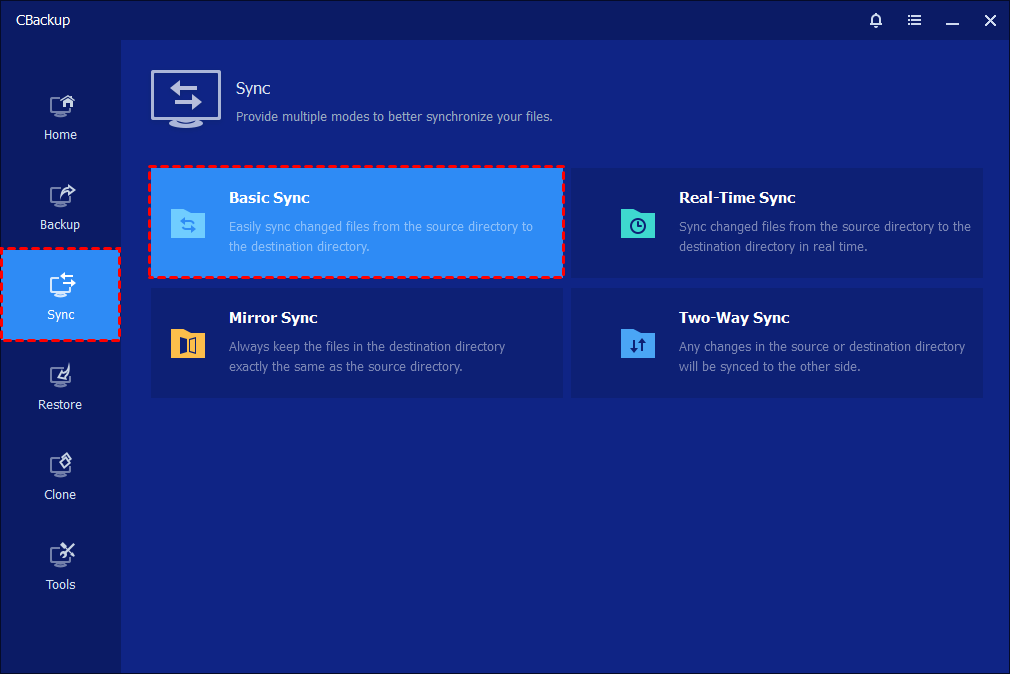
Step 1. Click the "Sync" tab on the left sides and then select "Basic Sync".
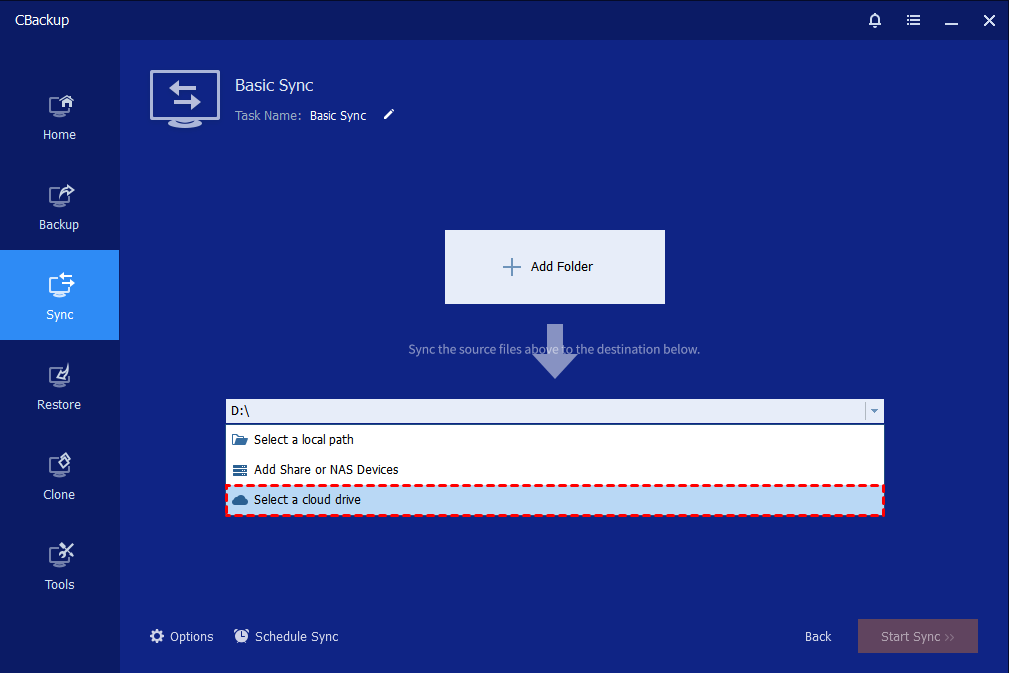
Step 2. You can name this backup using the Basic Sync Task field to help you distinguish it from other sync tasks. Click "Add Folder" to select the folder that you want to synchronize for external hard drive, NAS, or Cloud. You can click the "plus" icon to add more folders to sync.
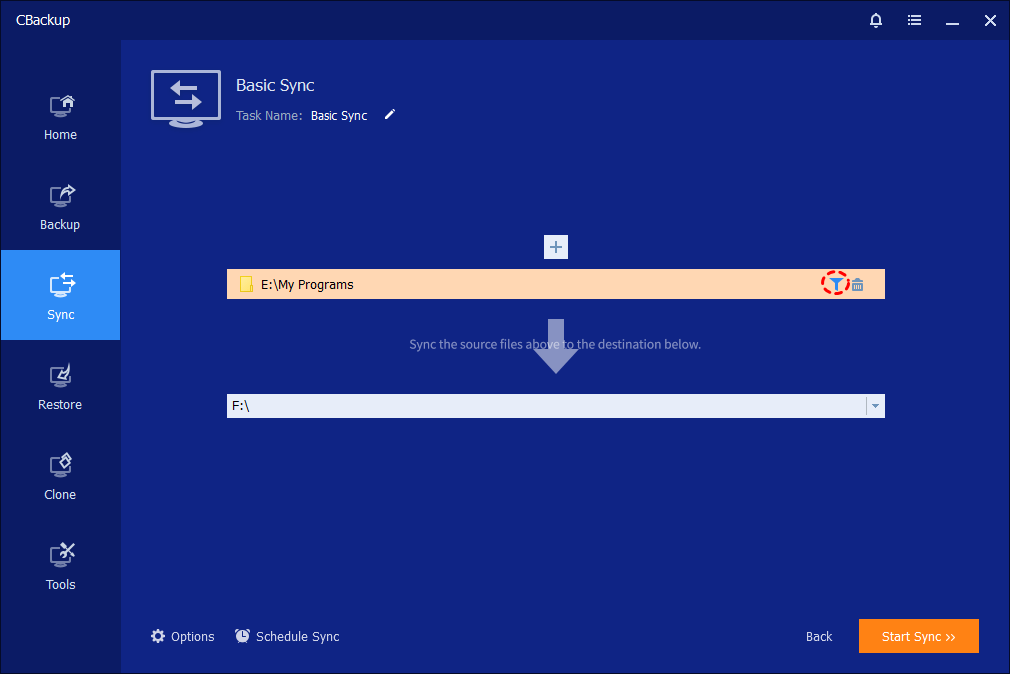
Note: When needing to filter files after you add the folders, you can click the "funnel" icon to open the"Filter Settings".
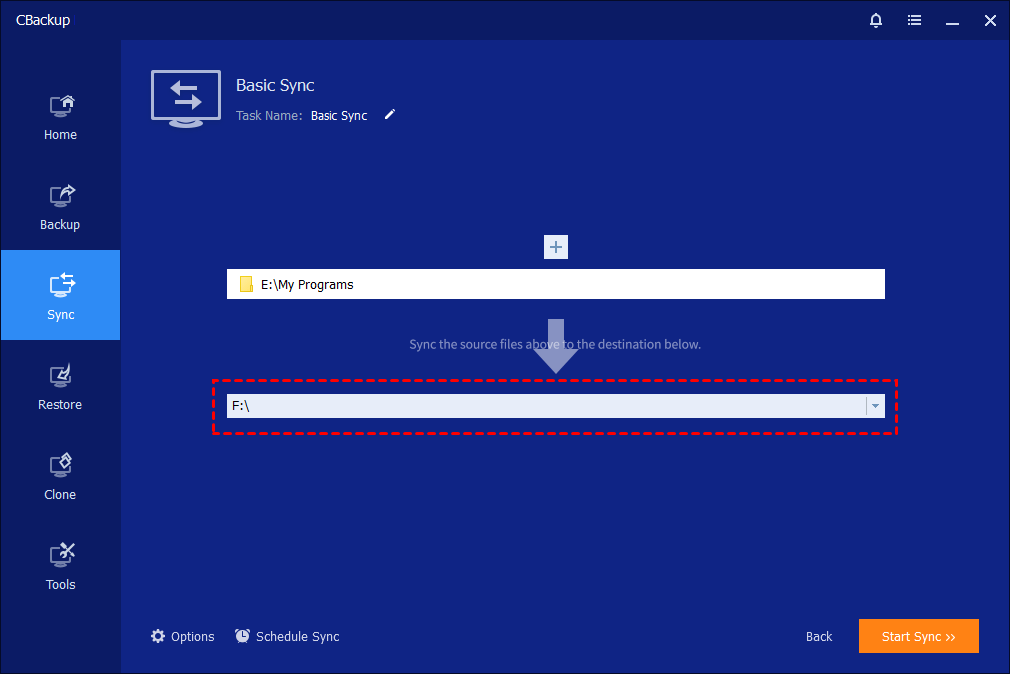
Step 3. Select a destination location to store the folder, then click "Start Sync" to perform the operation.
Step 4. While sync is running, you can click an icon in the lower-left corner to set to Shut down/Restart/Hibernate/Sleep PC after sync completion.
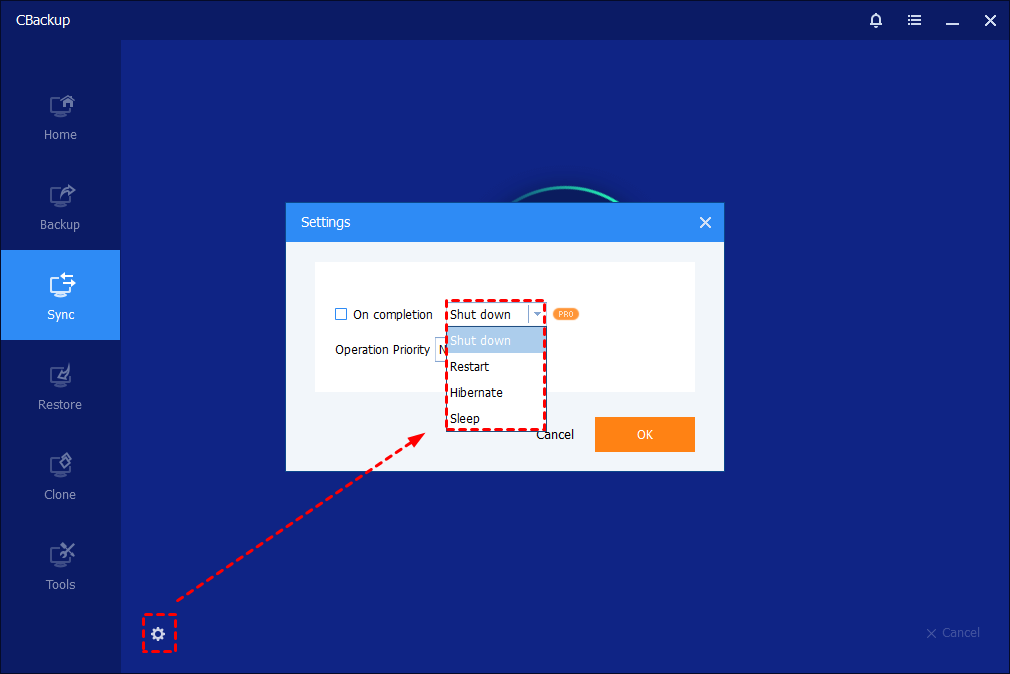
Step 5. When the sync is running, you can also click the underlined sentence to check the sync process in detail. And, please kindly wait for the sync process to complete and then click the "Finish" button.

Final thoughts
Finding the right GoodSync alternative is not simply about replacing one application with another. It is about choosing software that aligns with how you store, protect, and manage your data.
If your priority is Windows backup, system recovery, and automated protection, CBackup stands out as the best overall choice. Users focused on synchronization may prefer FreeFileSync, Resilio Sync, or Syncthing, while those prioritizing backup security can benefit from Duplicati. Advanced professionals seeking complete control often choose Rclone.
Each of these GoodSync alternatives brings unique strengths to the table. By evaluating your backup requirements, synchronization needs, and budget, you can confidently select the solution that best protects your data and beyond.
FAQs
🗨️ What is the best GoodSync alternative?
The best GoodSync alternative depends on your needs and priorities. Users looking for a combination of backup, cloud protection, and simple management often choose CBackup. Those who mainly need file synchronization may prefer FreeFileSync, Resilio Sync, or Syncthing. The right choice depends on factors such as features, budget, and platform compatibility.
🗨️ Is there a free GoodSync alternative?
Yes. There are several free GoodSync alternative options available. FreeFileSync, Syncthing, Duplicati, and Rclone all offer free versions with useful synchronization or backup features. Users who need basic cloud backup functionality can also consider CBackup's free plan.
🗨️ Which GoodSync alternative is best for backup?
For backup-focused users, CBackup and Duplicati are among the strongest GoodSync alternatives. They provide automated backup scheduling, data recovery options, and protection against accidental file loss. These features make them suitable for users who want more than simple file synchronization.
🗨️ What is the best GoodSync alternative free for open-source users?
Syncthing and FreeFileSync are two of the most popular choices for users seeking a GoodSync alternative free of licensing costs and restrictions. As open-source projects, they offer transparency, active community support, and flexible synchronization capabilities across multiple devices.
🗨️ Which alternative to GoodSync is easiest for beginners?
CBackup and Resilio Sync are often considered the easiest alternatives to GoodSync for beginners. Their user friendly interfaces, straightforward setup processes, and automated features help new users manage backups and file synchronization with minimal effort.
Free Get CBackup Now

Secure & Free