
Top 8 Iperius Backup Alternatives for Backup, Recovery, and Sync
This comprehensive evaluation provides an in-depth Iperius Backup review alongside the top free and paid alternatives, helping you discover efficient, cost-effective storage and disaster recovery solutions for your systems.

By Irene Updated June 26, 2026


🌟Quick Overview
Choosing the right Iperius Backup alternative depends on what you value most. Some users prioritize cloud backup and remote access, while others need full system recovery, advanced encryption, or fast file synchronization across multiple devices. There are plenty of reliable options available, ranging from free open source tools to premium backup platforms designed for complete data protection. The following table gives you a quick look at Iperius alternatives.
| Software | Best For | Operating Systems | Free Version | Key Strength |
|---|---|---|---|---|
| CBackup | Comprehensive backup solutions | Windows, Web | Yes | Excellent advanced features integration |
| Acronis Cyber Protect Home Office | Full system protection | Windows, macOS | Trial | Backup plus cybersecurity |
| Duplicati | Open source encrypted backups | Windows, macOS, Linux | Yes | Strong encryption and flexibility |
| Resilio Sync | Device to device synchronization | Windows, macOS, Linux | Yes | Fast peer to peer transfers |
| FreeFileSync | Folder synchronization | Windows, macOS, Linux | Yes | Easy visual file comparison |
| Carbonite | Automatic cloud backup | Windows, macOS | Trial | Simple set and forget backups |
| Syncthing | Private synchronization | Windows, macOS, Linux, Android | Yes | Completely decentralized |
| Backblaze | Unlimited cloud backup | Windows, macOS | Trial | Affordable unlimited storage |
8 best Iperius backup alternatives (free and paid options)
Data protection has become an essential part of both personal and business computing. Whether you are backing up family photos, business documents, virtual machines, or entire operating systems, having reliable backup software is critical.
While Iperius Backup is a popular solution known for its flexible backup options and support for cloud storage, FTP servers, and virtual environments, it may not be the ideal choice for everyone. Some users find its interface less intuitive than competing products, while others look for more advanced cloud integration, easier management, or a free alternative.
If you have been reading an Iperius Backup review and wondering whether there are better options available, this guide will help. We compare the best Iperius Backup alternatives, including both free and paid solutions, to help you find the right backup software for your needs.
1. CBackup
Overview
CBackup is one of the best Iperius Backup alternatives for users who want an all in one solution for backup, restore, sync, and disk cloning. While Iperius Backup is known for its broad range of backup options, CBackup focuses on making data protection easier and more accessible for both home users and businesses.
One of the biggest advantages of CBackup is its comprehensive backup capabilities. Users can create backups of their Windows operating system, entire disks, individual partitions, or selected files and folders. This flexibility allows users to protect everything from personal documents to complete system environments. If data loss, hardware failure, or system issues occur, CBackup also provides reliable restore options to help recover files or restore a system to a previous working state.
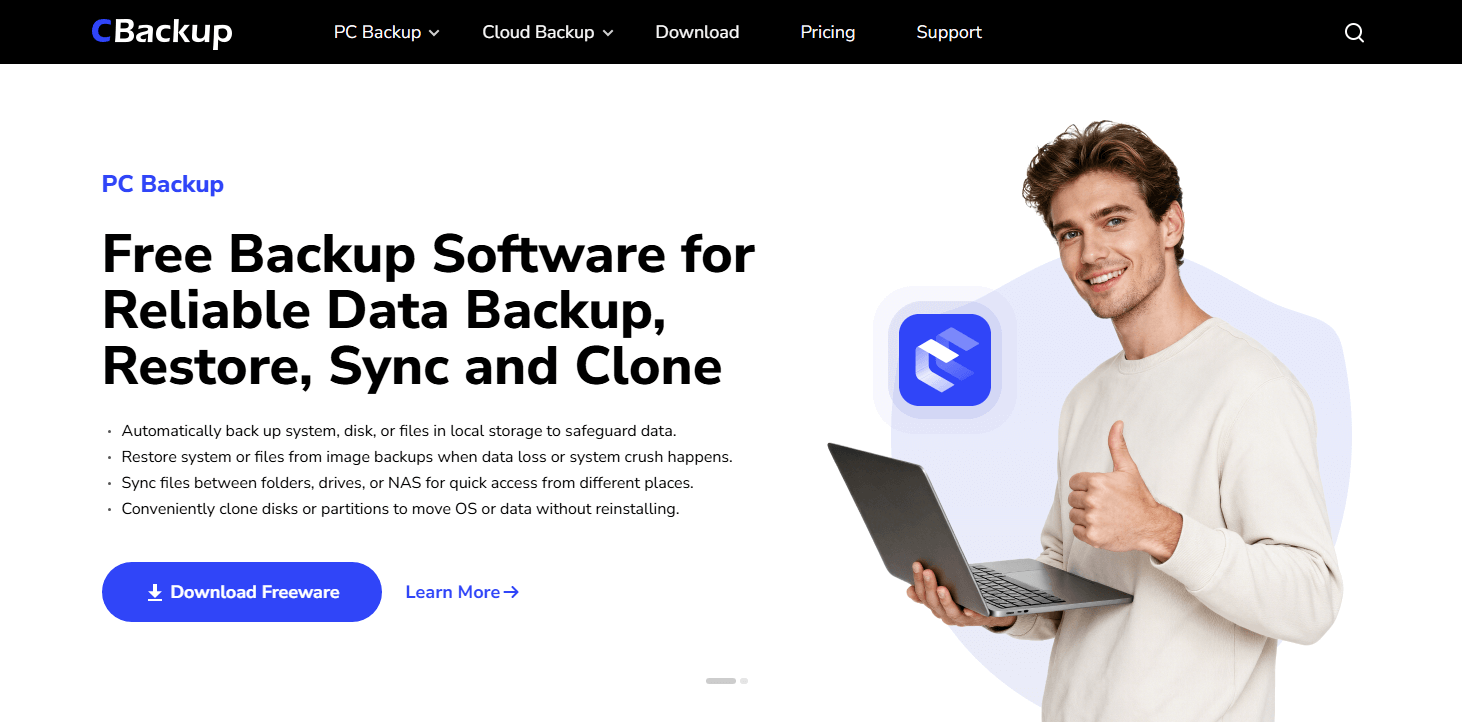
Another area where CBackup stands out is its synchronization and cloning features. The software supports multiple sync modes, including basic sync, mirror sync, two-way sync, and real-time backup and sync, helping users keep files consistent across different locations. In addition, disk cloning and system migration tools make it easier to upgrade hard drives or move Windows to a new SSD without reinstalling the operating system.
CBackup also supports backup destinations such as local drives, external hard drives, USB devices, Windows to NAS backup, and cloud sync. Automatic scheduling helps ensure that backups run regularly without requiring manual intervention. Compared with Iperius Backup, CBackup offers a more beginner friendly experience while still providing many of the advanced features that users expect from modern backup software.
Key Features
- System backup
- Disk backup
- Partition backup
- File backup
- System restore
- Windows recovery USB creation
- Automatic scheduled backup
- Incremental backup
- File synchronization
- Real time sync
- Two way sync
- Disk clone and system clone
- OS migration
- Backup to local drives, external drives, USB, and NAS
- PC to cloud backup
Pros
- Easy to use interface suitable for beginners
- Comprehensive backup, restore, sync, and clone functions
- Supports system, disk, partition, and file backup
- Multiple synchronization modes available
- Automatic backup scheduling
- Supports local, external, network, and cloud destinations
- Includes disk cloning and OS migration tools
- Free version offers a wide range of features
- Compatible with Windows PCs and Windows Server systems
Cons
- Some advanced features require a paid edition
- Primarily designed for Windows environments
- Fewer enterprise virtualization features than specialized business backup solutions
- Mobile device backup support is limited
- Cloud features are not as extensive as dedicated cloud management platforms
Best For
Home users, small businesses, and IT professionals who need an easy to use backup solution with backup, restore, sync, and cloning capabilities.
Pricing
Free version available. Paid plans start at affordable monthly rates depending on storage and transfer requirements.
2. Acronis Cyber Protect Home Office
Overview
Acronis Cyber Protect Home Office is often considered one of the most powerful alternatives to Iperius Backup, especially for users who want more than basic file backup. While Iperius Backup focuses primarily on backup and recovery, Acronis combines backup technology with cybersecurity tools to create a more complete protection platform.
One of the biggest reasons people choose Acronis is its ability to create full system images. This means you can make an exact copy of your operating system, installed programs, settings, and personal files. If your computer experiences a serious problem, you can restore everything and continue working without starting from scratch.
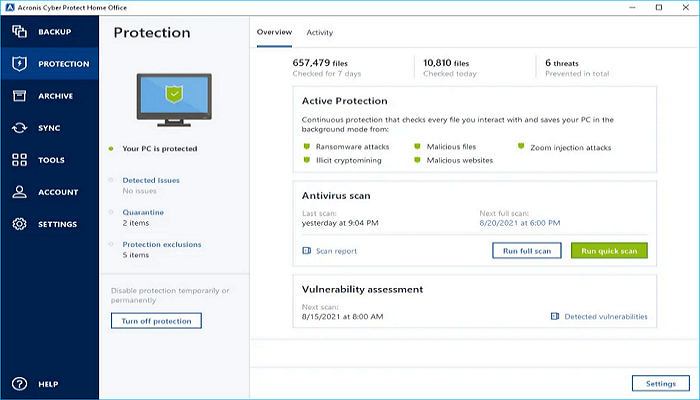
Another area where Acronis stands out is ransomware protection. Cyber threats continue to increase every year, and Acronis includes built in monitoring that helps detect suspicious activity before your files are damaged. This extra layer of protection can provide peace of mind for users storing important personal or business data.
The software also supports local backups, external drives, network storage, and cloud backups. This flexibility allows users to build a backup strategy that matches their needs. Although the interface contains many advanced options, it remains organized and easier to navigate than some enterprise backup solutions.
Compared with Iperius Backup, Acronis offers a more comprehensive protection package. However, the additional features also make it more expensive. For users who need complete backup, recovery, and security protection in one solution, Acronis remains one of the strongest options available.
Key Features
- Full disk imaging
- System cloning
- Cloud backup
- Ransomware protection
- Bare metal recovery
- Incremental and differential backups
- Backup scheduling
Pros
- Comprehensive backup and recovery capabilities
- Includes cybersecurity protection
- Supports full system restoration
- Multiple backup destinations available
- Reliable disaster recovery tools
- Strong reputation in the backup industry
- Suitable for both personal and business users
Cons
- Higher price than many competitors
- Subscription costs can increase with cloud storage
- More resource intensive than lightweight backup tools
- Interface may feel overwhelming for beginners
- Some advanced features may never be used by casual users
Best For
Users who need complete system protection and security features.
Pricing
Subscription based plans with multiple storage options.
3. Duplicati
Overview
If you are searching for a free Iperius Backup alternative, Duplicati is one of the most popular choices available today. It is an open source backup solution that focuses on security, flexibility, and compatibility with many different storage providers.
Unlike some backup programs that require expensive subscriptions, Duplicati is completely free to use. Despite being free, it includes features that are often found in premium backup software. This makes it attractive to both home users and IT professionals.
One of Duplicati's strongest features is encryption. Before files leave your device, they can be protected using strong encryption methods. This helps ensure that your data remains private even when stored in cloud services or remote locations.

The software also supports incremental backups. Instead of uploading entire files every time a change occurs, Duplicati only transfers the portions that have changed. This can save storage space and reduce backup times, especially for large files.
Another advantage is the wide range of supported destinations. Users can back up data to Google Drive, OneDrive, Amazon S3, Backblaze B2, FTP servers, NAS devices, and many other locations. This flexibility gives users more control over where their backups are stored.
Compared with Iperius Backup, Duplicati may require a little more setup and learning. However, for users who want a powerful, secure, and completely free backup solution, it is one of the best options available.
Key Features
- Open source software
- AES 256 encryption
- Incremental backups
- Data compression
- Web based management
- Cloud storage integration
- Flexible backup scheduling
Pros
- Completely free to use
- Strong security and privacy protection
- Supports many cloud storage providers
- Active open source community
- Flexible backup customization
- Available for Windows, macOS, and Linux
- No subscription fees
Cons
- Setup process can be challenging for beginners
- User interface feels less polished than commercial software
- Community support only
- Backup configuration requires some technical knowledge
- Performance may vary depending on backup settings
Best For
Advanced users seeking a free Iperius Backup alternative.
Pricing
Free.
4. Resilio Sync
Overview
Resilio Sync takes a different approach from traditional backup software. Instead of relying heavily on cloud storage providers, it uses peer to peer technology to transfer files directly between devices. This makes it one of the most unique alternatives to Iperius Backup.
The software is based on technology originally inspired by BitTorrent. However, instead of sharing files publicly, Resilio Sync creates private connections between your devices. This allows files to move directly from one computer to another without being stored on a third party server.
One of the biggest advantages is speed. Because files travel directly between devices, transfers can often be much faster than cloud based alternatives. This is especially useful for large media libraries, project files, or business documents that need frequent synchronization.
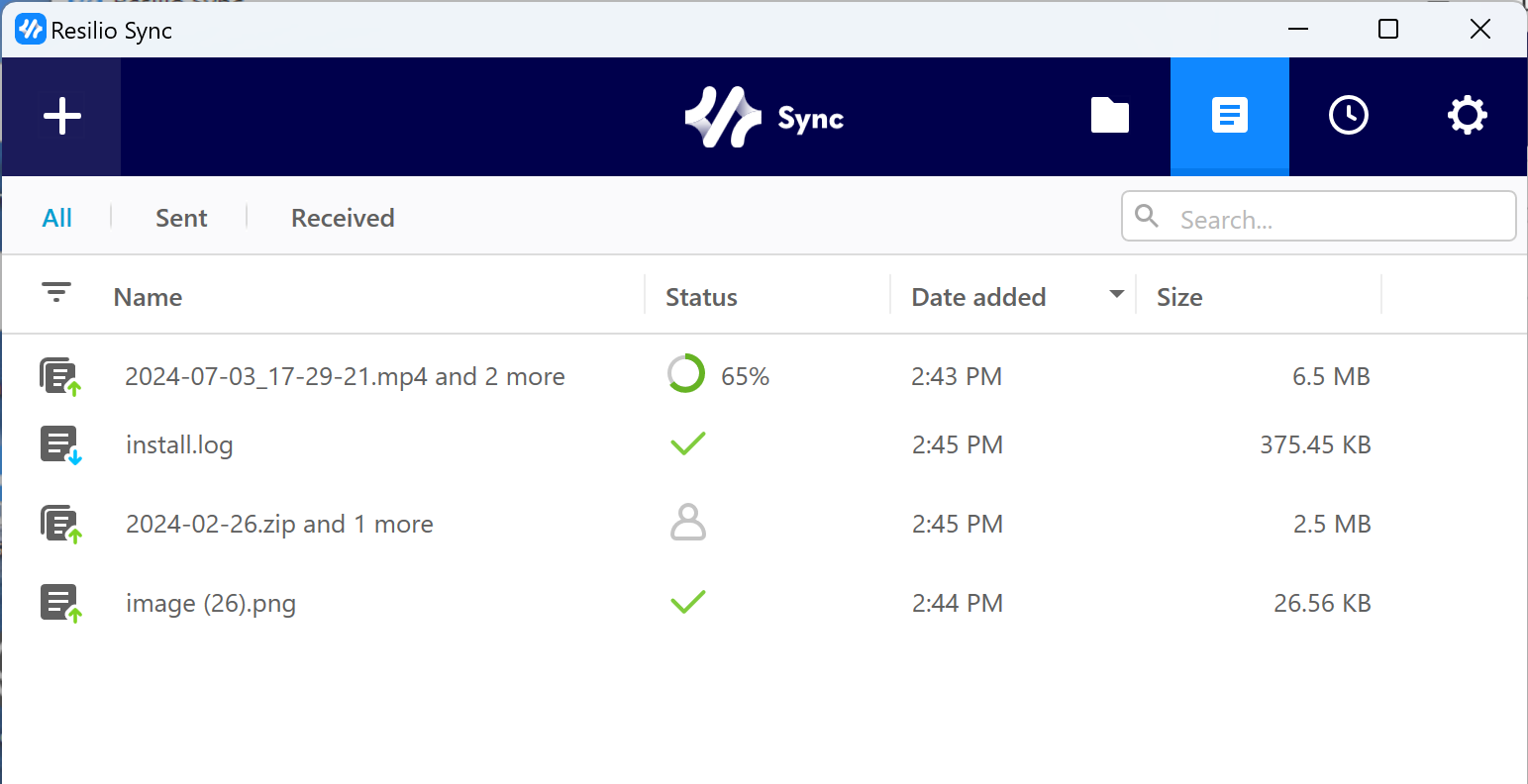
Resilio Sync also supports cross platform operation. You can connect Windows computers, Mac devices, Linux systems, NAS devices, and mobile phones. Once connected, files can stay synchronized automatically.
The software focuses more on synchronization than traditional backup creation. As a result, it may not be the best solution for users who need complete system imaging or long term backup archives. However, for users who regularly move files between devices, it performs exceptionally well.
Compared with Iperius Backup, Resilio Sync offers a simpler and faster way to keep files synchronized across multiple devices while maintaining a high level of privacy.
Key Features
- Peer to peer file synchronization
- Direct device to device transfers
- Selective synchronization
- Cross platform support
- Large file transfer support
- Automatic synchronization
- Mobile device access
Pros
- Extremely fast synchronization speeds
- No cloud storage limits
- Strong privacy protection
- Efficient for large files and media libraries
- Works across many operating systems
- Low system resource usage
- Simple file sharing between devices
Cons
- Not designed as a traditional backup solution
- Lacks full system backup features
- Limited versioning capabilities
- Advanced features require paid plans
- Requires participating devices to be available
Best For
Users who prioritize synchronization speed and privacy.
Pricing
Free version available with optional paid upgrades.
5. FreeFileSync
Overview
FreeFileSync has been a favorite among Windows, Mac, and Linux users for many years. It focuses on file synchronization rather than full system backup, making it a practical choice for users who want an easy way to keep folders updated across different locations.
One of the first things users notice is its visual comparison system. Before files are copied or synchronized, the software clearly shows the differences between folders. This makes it easier to understand exactly what will happen during a synchronization task.
The software supports one way synchronization, two way synchronization, and mirroring. This flexibility allows users to create workflows that match their personal or business requirements. Whether you want to keep an external drive updated or synchronize files between computers, FreeFileSync provides the necessary tools.
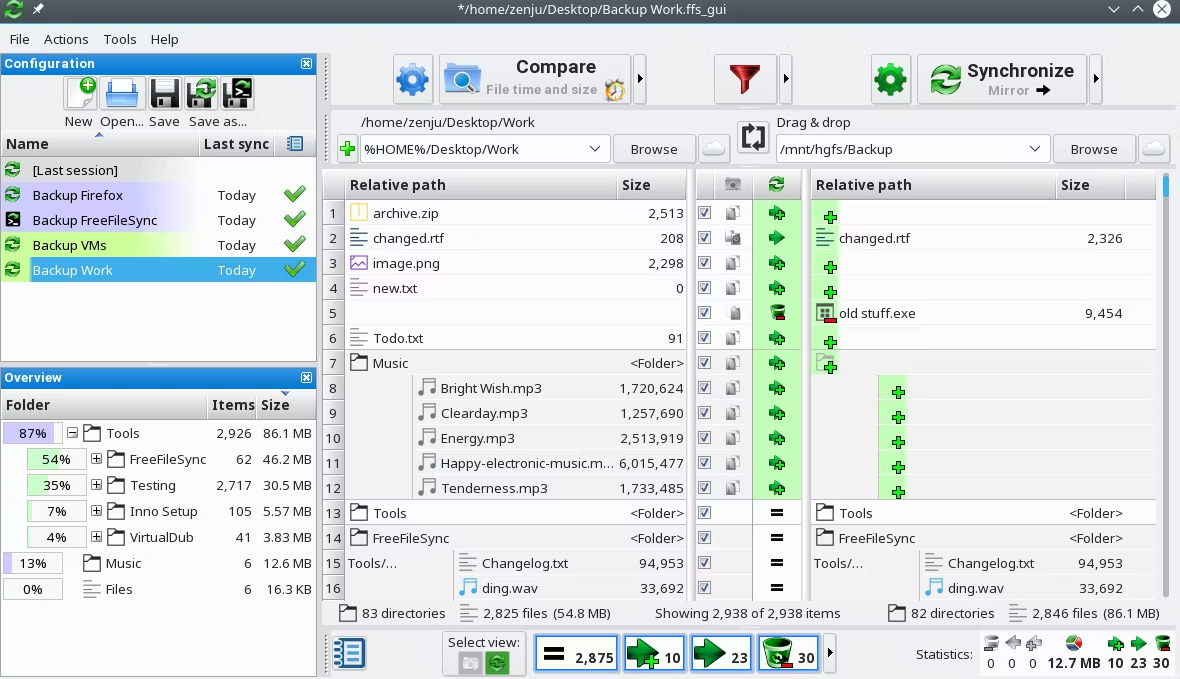
Another advantage is speed. The software is lightweight and optimized for handling large folders efficiently. Even users with thousands of files often report smooth performance.
While FreeFileSync does not offer advanced cloud backup services like some competitors, it performs extremely well for local and network based synchronization tasks. The software is also open source, which means users can use most features without paying subscription fees.
Compared with Iperius Backup, FreeFileSync is simpler and easier to understand. It may not replace enterprise backup software, but it is an excellent choice for everyday synchronization needs.
Key Features
- Folder synchronization
- File comparison
- Mirroring mode
- Two way synchronization
- Batch processing
- Real time monitoring
- Network drive support
Pros
- Free and open source
- Easy to understand interface
- Fast synchronization performance
- Highly reliable file comparison engine
- Supports local and network storage
- Lightweight installation
- Frequent updates from developers
Cons
- No built in cloud backup service
- Does not provide full system imaging
- Limited disaster recovery features
- Interface looks basic compared with modern competitors
- Focuses mainly on synchronization rather than backup
Best For
Users who need dependable file synchronization.
Pricing
Free with optional donation edition.
6. Carbonite
Overview
Carbonite is one of the most recognized names in cloud backup. For many years, it has helped users protect their files through automated cloud storage and simple backup management. If ease of use is your top priority, Carbonite is a strong Iperius Backup alternative.
The biggest advantage of Carbonite is simplicity. After installation, the software automatically begins protecting important files and folders with very little user involvement. This makes it appealing to people who do not want to spend time configuring complicated backup settings.
Carbonite continuously monitors files and uploads changes automatically. As a result, users do not have to remember to run backups manually. The software works quietly in the background while keeping data protected.
Cloud storage is included with subscription plans, which eliminates the need to purchase separate backup hardware. In addition, users can access files remotely through web browsers when needed.
Although Carbonite focuses heavily on cloud backup, it may not offer the same level of customization as some advanced backup products. Users who need extensive control over backup jobs may find other solutions more suitable.
Compared with Iperius Backup, Carbonite provides a more straightforward experience that is particularly attractive to home users and small businesses seeking dependable cloud protection.
Key Features
- Automatic cloud backup
- Continuous file protection
- Remote file access
- Cloud storage included
- Automatic backup scheduling
- External drive backup
- Simple file recovery
Pros
- Very easy to use
- Minimal setup required
- Reliable cloud infrastructure
- Automatic backup operation
- Good customer support
- Suitable for non technical users
- Secure cloud storage
Cons
- Subscription based pricing
- Less customization than advanced backup software
- Limited support for enterprise workloads
- Cloud focused approach may not fit every user
- Recovery options are less flexible than some competitors
Best For
Users who prefer a simple backup solution with minimal maintenance.
Pricing
Annual subscription plans.
7. Syncthing
Overview
Syncthing is an open source synchronization platform that enables secure file transfers between trusted devices.
Syncthing is a free and open source synchronization platform that has gained a strong reputation among privacy focused users. Unlike traditional cloud services, Syncthing keeps files under your direct control by synchronizing data between devices without relying on a central storage provider.
The software creates secure connections between approved devices and transfers files directly. This approach improves privacy because your data never has to be stored on third party servers. For many users, this is one of Syncthing's biggest advantages.

Despite being free, Syncthing offers a surprisingly polished experience. The web based management interface allows users to add devices, monitor synchronization activity, and manage folders with relative ease.
Another strength is security. All data transfers are encrypted, helping protect information while it moves between devices. Users can also configure versioning features to keep previous file versions available when needed.
Although Syncthing is excellent for synchronization, it is not designed as a complete backup platform. Users who require full system imaging or dedicated cloud backup services may need another solution alongside it.
Compared with Iperius Backup, Syncthing offers greater privacy and lower costs. For users who value control and open source software, it remains one of the best alternatives available.
Key Features
- Decentralized synchronization
- End to end encryption
- Device authentication
- File versioning
- Web based management
- Cross platform compatibility
- Real time synchronization
Pros
- Completely free and open source
- Excellent privacy protection
- No third party cloud dependency
- Active development community
- Lightweight performance
- Strong security architecture
- Full control over your data
Cons
- Not a complete backup solution
- Initial setup can be confusing
- Requires some technical knowledge
- No built in cloud storage
- Fewer convenience features than commercial products
Best For
Privacy conscious users who want complete control over their data.
Pricing
Free.
8. Backblaze
Overview
Backblaze is widely known for offering one of the simplest cloud backup services on the market. It is designed for users who want reliable protection without spending time learning complex backup software.
After installation, Backblaze automatically identifies important files and begins backing them up to the cloud. The process is largely automated, allowing users to focus on their work rather than backup management.
One of Backblaze's biggest strengths is its unlimited backup model. Instead of worrying about storage limits, users can back up large amounts of data for a predictable subscription fee. This makes it especially attractive for photographers, designers, video editors, and anyone with large collections of files.
The software also supports external hard drives, which is an important advantage for users who store data outside their primary computer. File recovery is straightforward, and users can restore data through downloads or physical recovery media in some regions.
While Backblaze does not include advanced system imaging tools, it excels at protecting personal files and business documents. Its simple interface and transparent pricing have helped it become one of the most trusted cloud backup providers.
Compared with Iperius Backup, Backblaze sacrifices some advanced functionality in favor of simplicity and unlimited cloud storage, making it an attractive option for many users.
Key Features
- Unlimited cloud backup
- Automatic backup
- External drive protection
- File version history
- Remote access
- Recovery by download
- Recovery drive shipment options
Pros
- Unlimited storage for one computer
- Very simple setup process
- Affordable pricing
- Reliable cloud backup service
- Excellent for large data collections
- Automatic protection of new files
- Good value for money
Cons
- Limited advanced backup customization
- No comprehensive disk imaging
- Focuses mainly on cloud backup
- Not ideal for complex business environments
- Fewer backup management options than some competitors
Best For
Users with large amounts of data seeking affordable cloud protection.
Pricing
Subscription based with unlimited backup capacity.
Which Iperius backup alternative should you choose?
The best alternative depends on your specific needs.
| Need | Recommended Software |
| Best overall recovery, sync, and backup | CBackup |
| Full system imaging and recovery | Acronis |
| Free backup software | Duplicati |
| Fast device synchronization | Resilio Sync |
| Folder synchronization | FreeFileSync |
| Simple cloud backup | Carbonite |
| Privacy focused synchronization | Syncthing |
| Unlimited cloud storage | Backblaze |
Why people seek Iperius backup alternatives?
Iperius Backup has built a solid reputation as a versatile backup solution for both individuals and businesses. It supports a wide range of backup tasks, including file backup, disk imaging, cloud backup, database protection, and virtual machine backup. For many users, it provides the flexibility needed to protect important data across different environments.
However, no backup software is perfect for everyone. As technology evolves and user needs change, some people begin looking for alternatives that better match their workflow, budget, or technical experience.
Common reasons users explore Iperius Backup alternatives include:
- The interface can feel less intuitive compared to newer backup solutions
- Some advanced features require purchasing higher tier licenses
- The free version may not provide enough functionality for long term use
- Cloud backup and cloud management features may feel limited for users who rely heavily on cloud storage
- New users may face a learning curve when configuring advanced backup jobs
- Certain competitors offer a simpler setup process and easier day-to-day management
- Some users prefer solutions with stronger synchronization, cloning, or cloud-focused capabilities
The good news is that there are plenty of excellent alternatives available today. Some focus on making backup easier for beginners, while others provide advanced disaster recovery, cloud integration, or enterprise level protection. Whether you are searching for a free Iperius Backup alternative, a more user friendly option, or a solution with additional features, the following software can help you protect your data more efficiently.
Final verdict
Iperius Backup remains a capable backup solution, particularly for users who need support for databases, virtual machines, and various storage destinations. However, it is not always the easiest or most cost effective option.
For users seeking the best Iperius Backup alternative, CBackup stands out for its comprehensive backup capabilities, simple management, and free plan. Those needing advanced disaster recovery should consider Acronis, while Duplicati and Syncthing are excellent choices for users looking for a free Iperius Backup alternative.
Ultimately, the right backup solution depends on your budget, technical expertise, storage requirements, and recovery goals. By evaluating the alternatives above, you can choose a platform that provides stronger protection and a better overall backup experience.
FAQs
1. What is the best Iperius Backup alternative for home users?
For most home users, CBackup is a strong choice because it combines backup, restore, sync, and disk cloning features in a beginner-friendly interface. Users looking for a simple backup may also consider Backblaze or Carbonite.
2. Is there a free alternative to Iperius Backup?
Yes. CBackup, Duplicati, FreeFileSync, and Syncthing are popular free alternatives. Duplicati focuses on secure backups, FreeFileSync specializes in file synchronization, and Syncthing provides private device to device syncing without relying on cloud storage.
3. Which Iperius Backup alternative is best for full system backup and recovery?
Acronis Cyber Protect Home Office is one of the best options for full system protection. It supports disk imaging, bare metal recovery, system cloning, and ransomware protection, making it suitable for users who need comprehensive disaster recovery capabilities.
4. Which backup software offers the best cloud backup features?
CBackup, Backblaze, and Carbonite are among the top choices for cloud backup and sync. CBackup provides flexible backup and data recovery options, while Backblaze is known for unlimited cloud storage and Carbonite focuses on automated cloud protection with minimal setup.
5. Can Iperius Backup alternatives migrate Windows to a new SSD or hard drive?
Yes. Several alternatives support disk cloning and OS migration. CBackup and Acronis both allow users to clone disks, transfer Windows to a new SSD, and replace aging drives without reinstalling the operating system.
Free Get CBackup Now

Secure & Free