
Veeam vs Acronis (2026): Which Backup Solution Wins?
In a Veeam vs Acronis evaluation, Veeam wins for virtualized VM recovery and Acronis excels at endpoint cybersecurity, while CBackup serves as a simple PC and cloud backup alternative.

By Ellie Updated July 24, 2026


Selecting an enterprise data protection platform often leads to a direct evaluation: Veeam vs Acronis. Both software providers dominate the backup and disaster recovery (BDR) market, yet they follow fundamentally different architecture models. Deciding between Veeam vs Acronis backup comes down to whether your infrastructure centers around data center virtual machines or distributed endpoints requiring built-in cybersecurity.
This evaluation breaks down core features, security architectures, licensing structures, and real-world deployment scenarios to help IT administrators, systems engineers, and MSPs choose the right platform.
What is Veeam vs Acronis?
To understand Acronis backup vs Veeam backup, you must look at their core design philosophies. One was built from the virtual hypervisor layer up, while the other evolved from disk imaging into a consolidated cyber protection stack.
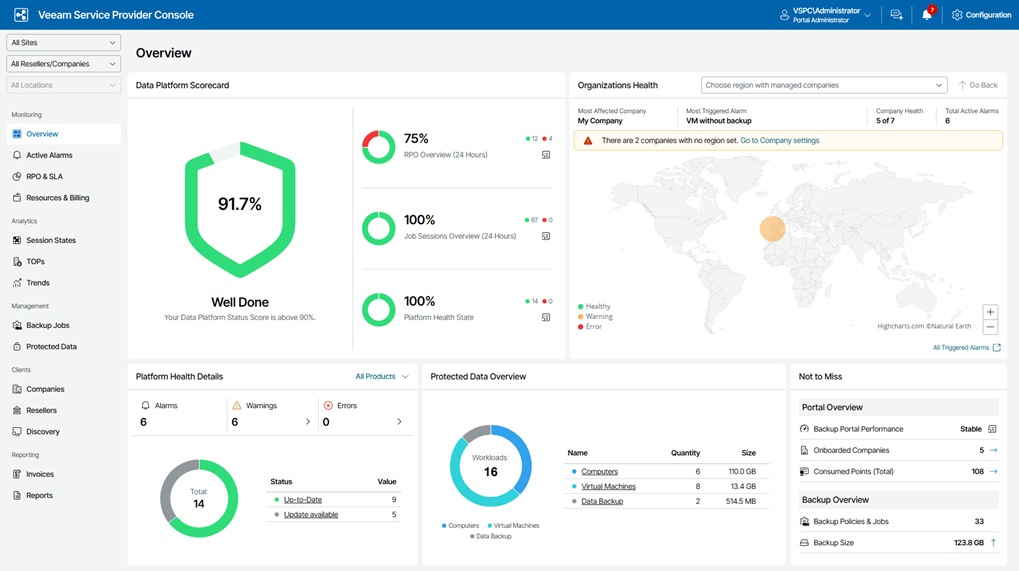
What is Veeam Backup & Replication?
Veeam focuses on enterprise data resilience. Built natively for virtualized environments (VMware vSphere and Microsoft Hyper-V), Veeam pioneered agentless virtual machine backup. It integrates deeply with enterprise storage hardware (SAN/NAS) and cloud object storage to deliver ultra-fast recovery time objectives (RTOs).
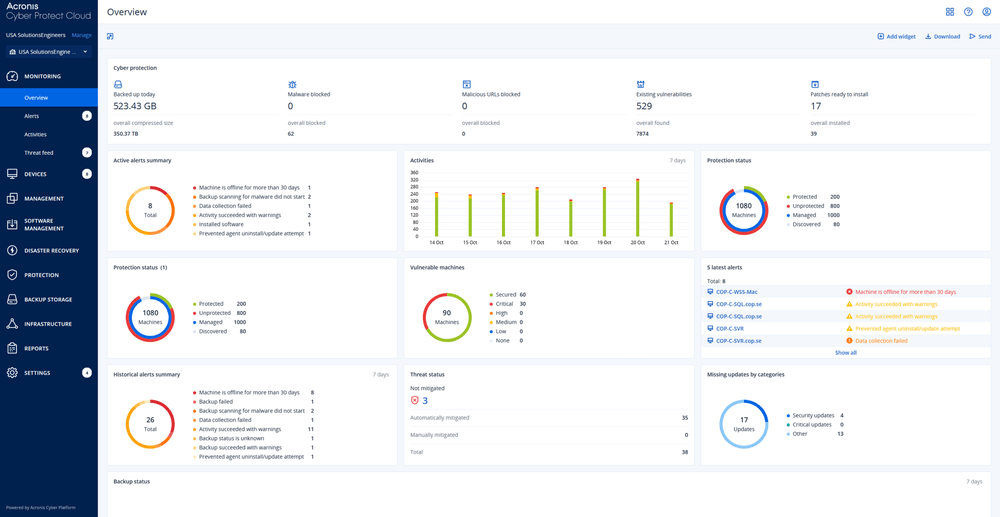
What is Acronis Cyber Protect?
Acronis bridges the gap between data backup and cybersecurity. Operating under the "Cyber Protection" paradigm, Acronis integrates backup, disaster recovery, behavioral anti-ransomware, patch management, and remote endpoint management into a single agent and centralized SaaS console.
Veeam vs Acronis Backup: Head-to-Head Comparison
The table below highlights the functional differences between both platforms:
|
Feature Dimension |
Veeam Backup & Replication |
Acronis Cyber Protect |
|
Primary Focus |
Data resilience, VM disaster recovery, enterprise storage |
Endpoint security, unified backup, MSP management |
|
Ideal Environment |
VMware vSphere, Hyper-V, Nutanix AHV, enterprise clouds |
Windows/Mac workstations, physical servers, distributed sites |
|
Ransomware Defense |
Hardened Linux repositories, S3 object lock, air-gapped tape |
Real-time AI behavioral detection, automatic file rollback |
|
Deployment Model |
On-premises management server, hybrid cloud |
SaaS cloud console, on-premises management server |
|
Agent Requirements |
Agentless for VMs; lightweight agents for physical systems |
Single unified agent for backup, security, and management |
|
Storage Choice |
Bring-Your-Own-Storage (BYOS) — SAN, NAS, AWS, Azure |
Built-in Acronis Cloud Storage or BYOS |
1. Virtualization & Instant Recovery Performance
Veeam remains the gold standard for hypervisor-level data protection. Its patented vPower technology enables Instant VM Recovery, allowing administrators to boot a failed virtual machine directly from a compressed backup file in seconds.
Acronis offers instant recovery capabilities for virtual environments, but its strength lies in cross-platform flexibility. Acronis can convert backups between physical and virtual platforms (P2V, V2V, V2P) with minimal conversion steps.
2. Cybersecurity & Ransomware Defense
The two vendors approach ransomware from opposing operational angles:
- Veeam's Strategy (Data Immutability): Veeam assumes your network will eventually be breached. It protects data by creating immutable backups using Linux Hardened Repositories or S3 Object Locking. Once written, these backups cannot be altered, encrypted, or deleted by unauthorized users or compromised domain admin accounts.
- Acronis's Strategy (Active Endpoint Protection): Acronis Active Protection continuously monitors endpoint process behaviors. If a rogue process attempts to encrypt files on a server or workstation, Acronis blocks the process and instantly restores affected files from a temporary cache.
3. Endpoint and Workstation Management
For organizations with hundreds of remote laptops, field devices, or physical Windows/Mac workstations, Acronis provides a more unified workflow. A single agent handles image-based backups, OS patch distribution, and anti-malware updates.
Veeam protects physical endpoints via the Veeam Agent for Microsoft Windows / Mac. While powerful and centralized through the Veeam Availability Console, it is primarily a backup engine rather than an all-in-one endpoint security suite.
4. Licensing Models and Total Cost of Ownership (TCO)
Licensing complexity is a common pain point when evaluating Veeam vs Acronis backup options.
- Veeam Universal License (VUL): Veeam uses a portable, workload-based subscription model. One VUL token protects one VM, one physical server, three workstations, or a cloud instance. This offers flexibility when shifting workloads from on-premises to the cloud, though initial entry costs can be higher for smaller IT budgets.
- Acronis Licensing Structure: Acronis provides per-device subscriptions (Workstation vs. Server) or per-gigabyte cloud storage models. This tiering allows small-to-medium businesses (SMBs) to scale operational costs incrementally based on endpoint counts.
Key Advantages and Disadvantages of Veeam and Acronis
Here is a quick breakdown of the core strengths and tradeoffs of both Veeam and Acronis to help you evaluate which platform aligns best with your IT infrastructure.
Key Advantages and Disadvantages of Veeam
Advantages:
- Unrivaled VM Recovery Speeds: Instant recovery of entire VMs, individual database records (SQL, Exchange, Active Directory), and individual files.
- Hardware Integration: Direct storage snapshot integration with HPE, NetApp, Pure Storage, and Dell EMC reduces performance overhead on hypervisors.
- Storage Independence: Complete freedom to use any local SAN/NAS, deduplication appliance (Data Domain), or public cloud storage without vendor lock-in.
- Enterprise Reliability: Widely recognized in the IT community for consistent recovery verification (SureBackup) and reliable execution.
Disadvantages:
- Licensing Complexity & Higher TCO: The Veeam Universal License (VUL) bundling model and mandatory infrastructure requirements can push initial entry costs beyond small business budgets.
- Steeper Learning Curve: Setting up dedicated proxy servers, hardened repositories, and SQL databases requires specialized IT expertise and active ongoing management.
- Infrastructure Heavy: Operates as a distributed backup system that requires dedicated local server resources, making it less ideal for pure cloud-native or lightweight environments.
- No Built-in Endpoint Security: Focuses strictly on data protection; lacks integrated native EDR, active anti-malware, or patch management tools for workstations.
Key Advantages& Disadvantages of Acronis
Advantages:
- All-in-One Security & Backup: Eliminates the need to run separate backup, antivirus, and patch management software on workstations.
- SaaS Native Console: Easy cloud management console makes multi-tenant administration straightforward for MSPs and distributed IT teams.
- Flexible Disk Imaging: Long-standing history of bare-metal restore capabilities across non-matching hardware components (Universal Restore).
- Predictable Endpoint Pricing: Simple per-workstation or per-server licensing tier structure.
Disadvantages:
- Slower Speeds in Large Virtual Environments: Lacks the ultra-fast hypervisor-level optimization and Instant VM Recovery efficiency that Veeam provides for massive VMware/Hyper-V data centers.
- Console & Feature Bloat: Merging backup, EDR, anti-malware, and patch management into a single software stack can lead to a cluttered interface and complex policy rules.
- Potential Cloud Storage Lock-in: Storing large volumes of backup data in proprietary Acronis Cloud storage can become considerably more expensive over time compared to flexible Bring-Your-Own-Storage (BYOS) models.
- Aggressive Default Policies: Built-in security modules occasionally trigger false positives on legacy software or localized files, requiring additional administrative tuning.
Lightweight Alternative for PC & Cloud-to-Cloud Backup: CBackup
While enterprise engines like Veeam and Acronis excel in complex server rooms and data centers, they are often over-engineered and expensive for personal workstations, small office setups, or multi-cloud storage management.
If your core goal is backing up local Windows PCs, executing disk clones, or protecting data across cloud services without managing complex server infrastructure, CBackup provides an efficient, cost-effective online cloud backup service alternative.
Why Consider CBackup?
- PC & Server Data Protection: Offers simple scheduled file, partition, and system backups for Windows 11/10/8/7 and Windows Servers, complete with flexible restoration options.
- Cloud-to-Cloud Backup & Sync: Directly backs up or synchronizes files between cloud providers (Google Drive, OneDrive, Dropbox) server-side, eliminating the need to download data locally before re-uploading.
- Combined Cloud Storage: Merges free or unused storage across multiple cloud accounts into a single pool, creating scalable cloud repositories at minimal cost.
- No Enterprise Overhead: Requires no dedicated management server or specialized certification to configure and operate.
How to Set Up Automatic PC-to-Cloud Backup
Step 1. Create an Account and Launch CBackup: Launch the CBackup Desktop Client on your PC/Server and log into your free account.
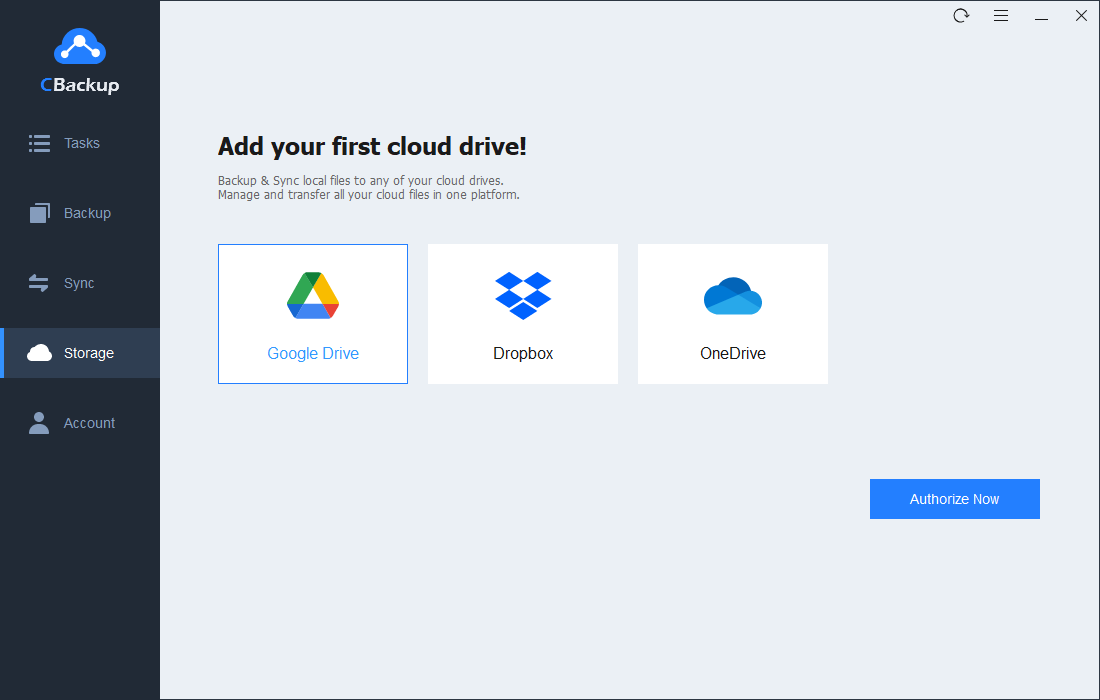
Step 2. Authorize Your Target Cloud Storage: Go to Storage, choose your cloud provider (Google Drive, OneDrive, or Dropbox), and complete OAuth authorization.
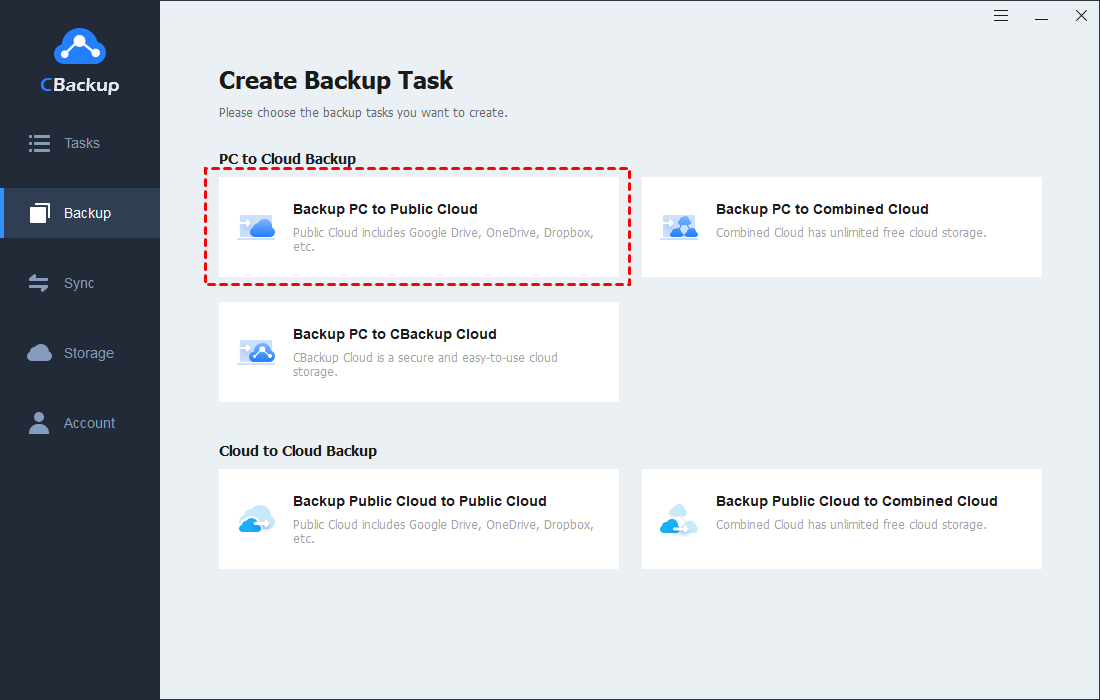
Step 3. Configure the PC Backup Task: Go to Backup > Backup PC to Public Cloud, then select the local folders/drives to protect and choose your connected cloud destination.
Step 4. Set Up Schedule & File Filters: Click Settings to set an automated backup frequency (Daily, Weekly, or Monthly) and configure optional file filters.
Step 5. Initiate the Backup: Click Start Backup. CBackup will run the initial backup and continue executing scheduled tasks automatically in the background.
Conclusion
Choosing between Veeam and Acronis comes down to your primary infrastructure focus and security architecture:
- Choose Veeam if your core environment consists of heavily virtualized data centers (VMware ESXi/Hyper-V), requires near-zero recovery time objectives (RTOs), and relies on immutable storage repositories for data resilience.
- Choose Acronis if you manage distributed endpoints (PCs, remote workstations, and physical servers) and want an all-in-one platform that merges backup, active anti-malware, and system patch management into a single management agent.
For individual users, small offices, or remote teams seeking an easy way to back up local Windows systems and sync multi-cloud storage without enterprise overhead, CBackup offers an efficient, budget-friendly alternative.
FAQs
Is Veeam better than Acronis for virtual machines?
Can Acronis Cyber Protect replace traditional antivirus software?
How do Veeam and Acronis handle Microsoft 365 backups?
Both platforms offer dedicated Microsoft 365 protection:
- Veeam Backup for Microsoft 365 requires separate licensing or VUL consumption and gives you full control over where backup data is stored (on-premises or cloud object storage).
- Acronis Cyber Protect offers Microsoft 365 protection as a direct cloud-to-cloud SaaS service, backing up Exchange Online, OneDrive, SharePoint, and Teams directly to Acronis Cloud or customer-managed storage.
What is the main difference between Veeam VUL and Acronis per-device pricing?
What is a simpler alternative to Veeam and Acronis for PC and cloud backup?
Free Get CBackup Now

Secure & Free