
Acronis True Image vs IDrive (2026): Comprehensive Hands-On Comparison
Acronis True Image and IDrive overlap, but they solve different backup priorities. This guide compares full-system imaging, disk cloning, cloud storage, multi-device protection, ransomware recovery, restore workflows, and cost structure. It gives home users, creators, and small teams a practical way to choose without relying on promotional pricing or one-size-fits-all rankings.

By Ellie Updated September 18, 2026


Choosing between Acronis True Image and IDrive isn’t just about selecting backup software, it is about defining your business or personal Recovery Point Objective (RPO) and Recovery Time Objective (RTO). While both protect your digital assets, Acronis True Image leans heavily toward low-RTO system recovery, active OS cloning, and integrated cyber protection. In contrast, IDrive prioritizes cost-effective, multi-device cloud backup with centralized storage management.
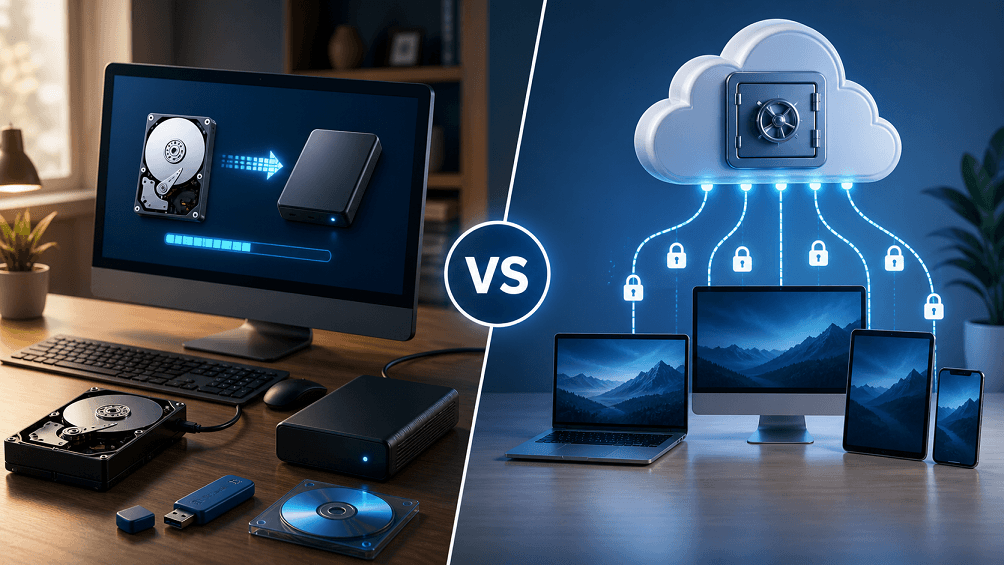
This guide delivers an in-depth comparison covering disk cloning mechanics, cloud backup architecture, privacy controls, hardware matrix coverage, and true total cost of ownership (TCO) beyond introductory discounts.
Key Quick-Take Summary
| Feature / Scenario | Acronis True Image | IDrive | Best Alternative: CBackup |
| Primary Focus | Bare-metal recovery, live disk cloning, integrated anti-ransomware | Multi-device cloud backup, cross-platform file sync, versioning | Cloud storage aggregation, multi-cloud management & cloud-to-cloud backup |
| Active OS Disk Cloning | Native & Live (BitShift / Shadow Copy / APFS Snapshot) | ❌ Not supported for active boot drives (Backup/Restore only) | ❌ Not supported (Designed for cloud file & data-level protection) |
| Device Model | Strict per-seat / per-device license | Multi-computer & mobile coverage under one shared capacity | Unlimited PC client connections & unlimited linked cloud storage accounts |
| Hardware / Target Matrix | Local drives, NAS (SMB/NFS), Acronis Cloud | Local drives, NAS (Synology/QNAP apps), IDrive Cloud, Express drives | Local drives, Google Drive, OneDrive, Dropbox, CBackup Cloud |
| Large Data Transport | Cloud recovery dependent on user bandwidth | IDrive Express physical hard drive shipment | Server-side Cloud-to-Cloud backup (zero local bandwidth consumption) |
IDrive Entire Machine vs. IDrive Mirror vs. Acronis Live Cloning
A common point of confusion for buyers is distinguishing between System Imaging, Image-based Cloud Backup, and Active Disk Cloning. Failing to understand these technical boundaries can lead to unbootable drives during a disaster recovery event.
1. Acronis True Image: Live Active Cloning
- How it works: Uses Volume Shadow Copy Service (VSS) on Windows and APFS Snapshots on macOS to create a sector-by-sector or used-sector clone of a live, running operating system.
- Key Boundary: Direct Drive-to-Drive Migration. You can replace an old HDD with a new NVMe SSD while working on the computer. Upon completion, swapping the physical drive results in an immediately bootable system without requiring recovery media creation or cloud restoration.
2. IDrive Entire Machine Backup
- How it works: Captures the OS, system state, application files, and boot partitions, converting them into an encrypted image file stored in the IDrive cloud or a local drive.
- Key Boundary: Backup & Restore Workflow. It is NOT a live disk cloning tool. You cannot use IDrive Entire Machine to clone Drive A directly to Drive B for an instant upgrade. To restore a dead PC, you must build an IDrive Bootable Rescue Media (USB), boot into the recovery environment, pull the image from the cloud or local storage, and overwrite the target drive.
3. IDrive Mirror
- How it works: A specialized deployment within IDrive focused on continuous image-based protection for Windows PCs and Servers. It creates synthetic full backups and incremental snapshots.
- Key Boundary: Disaster Recovery & Bare-Metal Staging. IDrive Mirror focuses on cloud-managed disaster recovery, restoring full disk images to bare-metal hardware or Virtual Machines (VMware/Hyper-V). It does not provide hot-swappable local drive duplication.
Comprehensive Support Matrix: NAS, External Drives, and Mobile
Before selecting a vendor, verify your hardware environment against their native OS integrations and protocols:
| Target / Platform | Acronis True Image | IDrive |
| Windows & macOS | Full bootable backup, active live cloning, file backup | Full file backup, Entire Machine backup, IDrive Mirror |
| Linux Support | Supported via Acronis Cyber Protect Home Office / Enterprise | Backup via command-line interface (CLI) scripts and web console |
| NAS Protection (Synology, QNAP, ASUSTOR) | Backup to NAS via SMB / NFS shares. Requires desktop app running | Native NAS Apps available in QTS / DSM Package Centers for direct cloud backup |
| External Hard Drives & DAS | Full support (included in local backup rules and cloning workflows) | Full support (can be included in unified account quota) |
| iOS / Android Mobile Devices | Mobile contacts, photos, videos, and calendar backup to local PC/Cloud | Native mobile apps for full photo/video backup, contact sync, and cross-device access |
| Mapped Network Drives | Supported as source and target | Supported as source (requires proper account privilege configuration) |
Zero-Knowledge Encryption, Data Centers, and Recovery Risks
Data security involves a critical trade-off: Maximum Privacy vs. Data Recoverability. Both vendors implement enterprise-grade security, but their key management policies dictate what happens when disaster strikes.
Private Key (Zero-Knowledge) Architecture
- Acronis True Image: Offers optional user-defined end-to-end AES-256 encryption for backup sets. The key is defined locally and is never transmitted to Acronis servers in plaintext.
- IDrive: Supports private key encryption (Zero-Knowledge) during account setup. You can choose either a default system key or set a private key that only you possess.
| Security Feature / Dimension | Standard Encryption (Provider-Managed) | Zero-Knowledge Private Key Encryption |
| Key Custody | Held by Provider in secure key vault | Held exclusively by User (Never sent in plaintext) |
| Password Reset Support | Supported via account email/recovery | ❌ Impossible (No backdoors or admin resets) |
| Data Loss Risk | Low (Account can be restored if password lost) | ⚠️ Extreme (Lost key = Permanent, irreversible loss) |
| Compliance Alignment | General privacy & data protection | HIPAA, GDPR strict privacy, zero-trust requirements |
| Product Availability | Acronis True Image / IDrive (Default) | Acronis True Image (Optional) / IDrive (Optional) |
| Best For | Everyday users needing standard cloud security | Privacy purists, medical/financial records, legal data |
Critical Risk Warning: The Lost Key Scenario
If you opt for Private Key Encryption / Zero-Knowledge Privacy with either service:
- No Backdoor: Neither Acronis nor IDrive customer support can decrypt your files or reset your private passphrase.
- Account Lockout: If you lose your encryption passphrase, your cloud backups become mathematically impossible to recover, resulting in total data loss.
- Best Practice: Keep a physical, offline paper copy or an encrypted password-manager record of your private encryption key in a secure location.
Data Center Locations & Compliance
- Acronis: Operates over 50 global data centers across North America, Europe, Asia-Pacific, and Latin America, allowing localized data residency compliance (GDPR, HIPAA compliance layers available).
- IDrive: Primary data centers are located in the United States (East Coast and West Coast) with ISO 27001 certification and enterprise physical security controls.
IDrive Express: Physical Seeding & Disaster Recovery
For users managing terabytes of data, cloud bandwidth quickly becomes the bottleneck during an emergency recovery—taking days or weeks over standard home internet. IDrive addresses this with IDrive Express, a physical hard drive shipment service designed to bypass internet throttle limits.
Key Service Comparison & Limits
| Feature | IDrive Express | Acronis True Image |
| Physical Drive Service | Included Free (1–3 times/year based on plan) | ❌ Not available for personal/home plans |
| Primary Use Case | Initial full backup (Seeding) & emergency recovery | Internet-only recovery |
| Transfer Speed Limit | Local USB 3.0 / NVMe transfer rates | Limited by user's ISP download bandwidth |
| Data Security | Drive is encrypted with user's AES-256 key during transit | N/A |
If your full system backup exceeds 2 TB, or if your home internet has a strict data cap/slow upload speed, IDrive Express makes initial seeding and full disaster recovery significantly faster than pure cloud restoring.
Detailed Cost Breakdown: Introductory vs. Standard Renewal Rates
Comparing initial promotional banners leads to inaccurate budgeting. A true comparison requires evaluating standard renewal rates, per-device licensing costs, and cloud capacity allocations over a 3-year TCO lifecycle.
1. Acronis True Image Subscription Tiers (Standard MSRP)
| Plan Tier | Protected PCs/Macs | Cloud Storage Included | Key Features Included | Approx. Standard Annual Cost |
| Essentials | 1, 3, or 5 | ❌ Local Only | Active cloning, local image backup, ransomware protection | ~$49.99 / yr (1 PC) |
| Advanced | 1, 3, or 5 | 500 GB included (Expandable) | Cloud backup, automatic cloud replication, Microsoft 365 backup | ~$89.99 / yr (1 PC) |
| Premium | 1, 3, or 5 | 1 TB included (Up to 5 TB) | Blockchain notarization, electronic signatures, priority support | ~$124.99 / yr (1 PC) |
Acronis charges primarily per machine. Protecting 5 PCs with cloud storage across all devices requires higher-tier multi-seat licenses and storage upgrade add-ons.
2. IDrive Plan Tiers (Standard MSRP)
| Plan Tier | Supported Devices | Storage Quotas | Primary Use Case | Approx. Standard Annual Cost |
| IDrive Free | Unlimited | 10 GB | Testing & light mobile sync | $0 |
| Personal 5 TB | Unlimited PCs, Macs, Mobile | 5 TB Shared Pool | Households, power users, multi-device owners | ~$79.50 / yr (Standard renewal) |
| Personal 10 TB | Unlimited PCs, Macs, Mobile | 10 TB Shared Pool | Content creators, video editors | ~$99.50 / yr (Standard renewal) |
| Team / Business | Multiple Users / Servers | 250 GB to 500 GB+ | SMBs, Windows Server, SQL, Exchange, NAS support | Starts at ~$99.50 / yr |
IDrive charges primarily per cloud storage pool. A single 5 TB Personal account can back up 8 household computers and 4 smartphones at no extra per-device license fee, provided the combined data remains under 5 TB.
3. True Total Cost of Ownership (TCO) Breakdown
When comparing long-term costs, looking solely at first-year promotional discounts can be misleading. Here is how the total cost scales based on typical usage scenarios over 3 years:
- Single PC with Small Storage (1 PC, 500 GB Cloud Storage):
- Acronis True Image (Advanced Plan): ~$54.99/year → 3-Year Total: ~$164.97
- IDrive (Personal 5TB Plan): ~$100/year renewal → 3-Year Total: ~$200–250
- CBackup: Free plan covers basic PC-to-Cloud backups; or Combined Cloud Storage starting at $9.99/mo for unlimited device links.
- Multi-Device Household or Small Office (5 PCs, 4 TB Total Data):
- Acronis True Image: Requires a 5-computer license tier (~$129.99/year) → 3-Year Total: ~$389.97.
- IDrive: A single IDrive Personal 5TB plan covers unlimited PCs for ~$99.50/year → 3-Year Total: ~$298.50 (significantly more cost-effective for multi-device setups).
- CBackup: Ideal if you already have unused storage across Google Drive or OneDrive. CBackup aggregates your existing cloud accounts into a unified storage pool at $0 additional storage cost.
When CBackup Is the Smarter Alternative
While Acronis excels at full-system disk cloning and IDrive provides multi-device endpoint backups, not every user needs complex OS-level imaging or heavy local backup software. If your goal is to protect files across multiple computers without paying steep per-device licensing fees, or if you want to connect and combine your existing Google Drive, OneDrive, and Dropbox accounts into one large backup target, CBackup offers a lighter, more flexible solution.
Why Choose CBackup?
- Combine Free/Existing Cloud Storage: CBackup connects multiple Google Drive, OneDrive, and Dropbox accounts, merging their free or unused capacity into a single large virtual storage pool.
- Cloud-to-Cloud Server-Side Sync: Transfer data directly between cloud services (e.g., Google Drive to OneDrive) without using your local PC's internet bandwidth or leaving your computer powered on.
- Cost Optimization: Ideal for users who want automated, encrypted file-level backup from Windows PCs to existing cloud storage without per-device licensing constraints.
Final Verdict
Choose Acronis True Image when system imaging, active disk cloning, fast local recovery, and integrated cyber protection matter more than maximizing cloud capacity across many endpoints. Choose IDrive when one account must protect several computers and mobile devices, cloud versioning is central, and physical transfer may help with large datasets. Consider CBackup for a lighter file-to-cloud workflow that uses supported cloud accounts you already maintain.
The deciding test is not the feature list; it is whether you can restore the right data within the time your work can tolerate. Build a small pilot, disconnect a test drive or delete a test folder, and prove the recovery path before moving all devices.
Frequently Asked Questions
Is Acronis True Image better than IDrive for disk cloning?
Can IDrive restore an entire Windows computer?
Which service is better for multiple devices?
Which is better against ransomware?
Should I compare introductory prices?
Can CBackup replace both products?
Free Get CBackup Now

Secure & Free