
How to Registry and Activate CBackup
The paid program needs to be activated before you use it. Please note that there are two ways to register the program: online and offline registration.

by PublicOwin Lasted Updated January 21, 2026


After you purchase the software, you will receive a license code with the product. There are two ways to activate the program: online and offline registration.
Online Registration
Generally, if your computer has the internet, you can use an online registration method to register the software.
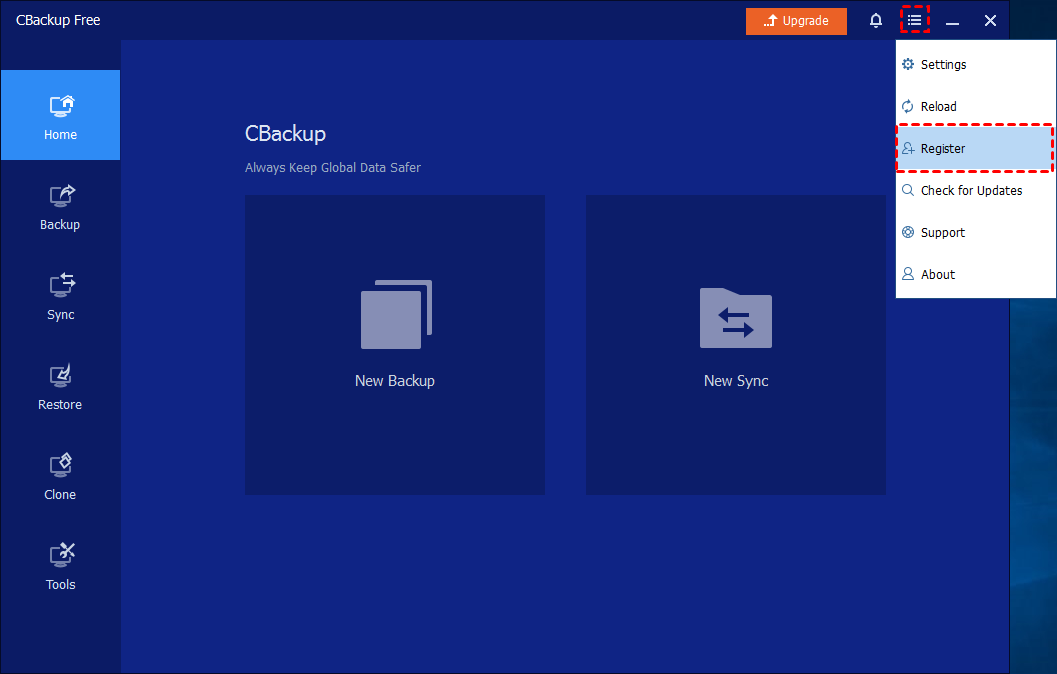
Step 1: Click "Menu"-"Register" button
To activate the program, you can simply load CBackup and click the "Menu"-"Register" button. Or, if you install the unregistered version (CBackupSetup.exe), it will automatically pop up the registration window when you start the software.
Step 2: Copy License Code to Register
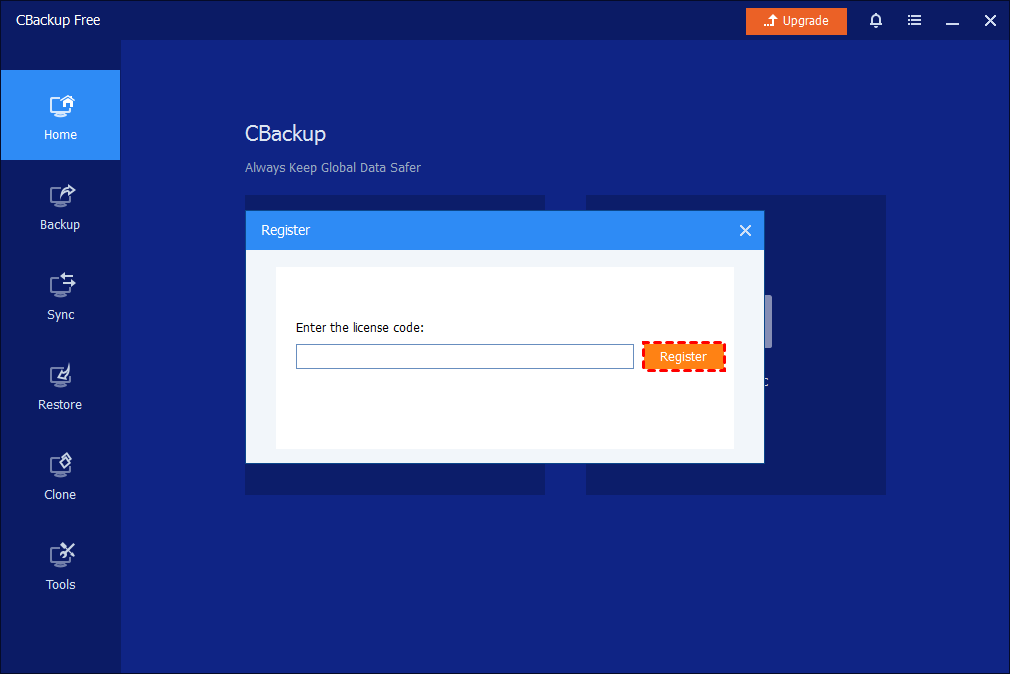
Put the license code into the registration box, and then click the "Register" button. After registering successfully, it will be the edition (Pro or Technician) you purchased.
Notes:
- To avoid typing in incorrect characters, it is better to copy and paste the license key into the registration box. (For example, it is easy to misunderstand the letter "O" and the number "0")
- Please do not leave space before and after the registration code when you put it in the register box.
- And please make sure the internet connection is stable.
Offline Registration
To activate a computer in the environment without an internet connection, you can do offline registration. Please note that the offline key needs to be generated individually.
Step 1: Run CBackup without Internet
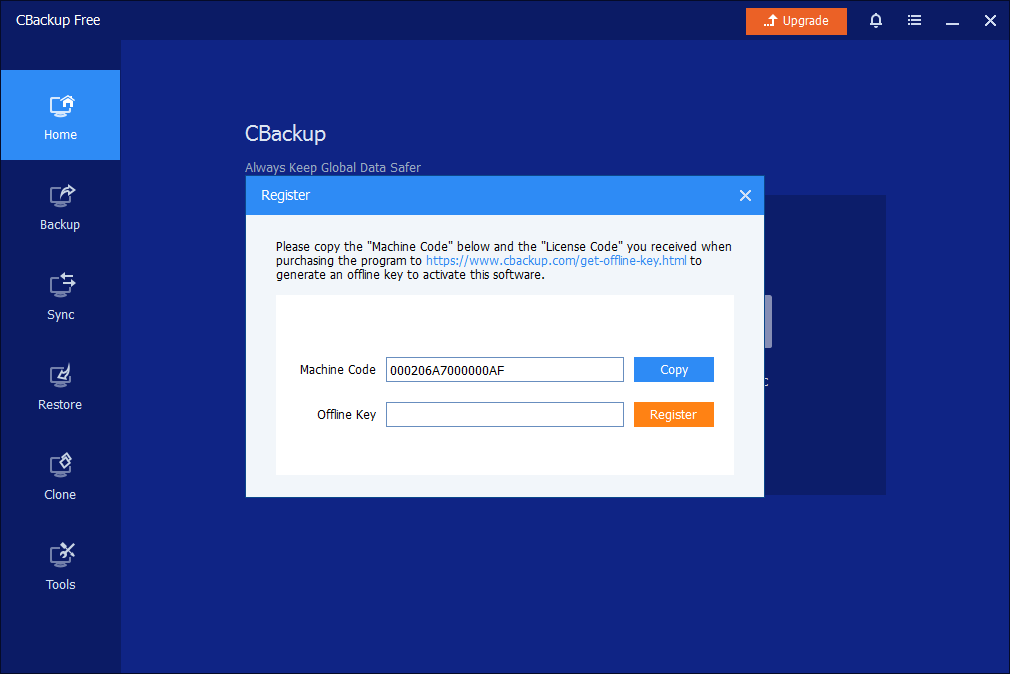
Please start CBackup without an internet connection, then click the "Register" button, so you will pop up an offline registration window (below). Then, connect to the internet and open the URL (https://www.cbackup.com/get-offline-key.html ) on the offline register window as follows. Or, you can open the URL on another computer with an internet connection.
Step 2: Get Offline Key
Enter your license code and machine code (copy it from the offline registration window) on the opening webpage to get an offline key.
Step 3: Copy Offline Key to Register
Finally, you will get an offline key. You can copy and paste it into the offline key box and click the "Register" button to register.
FAQs
Q: Can we migrate the license to another computer (License Agreement)?
A: Generally, LICENSEE is not allowed to lease, sell, rent out, or pass the Software to another person in any way. Such a license is non-transferable and non-assignable, except in limited circumstances. The limited circumstances include where the original computer the Software license was deployed on: (i) becomes non-functioning; and (ii) falls into disuse. In such cases, the license is transferable to a replacement computer. If you need to transfer the license to a new computer based on the above circumstances, please contact the support team to reset the licenses.
Q: Registration failed. The license code has exceeded the maximum number of allowed registrations. Please buy a new license code to register.
A: Generally, this registration code of CBackup Pro supports limited device registration. If you replace the hardware, system, etc., it will be recognized as a new device, or if you replace the computer, the registration code cannot be used on the new device due to registration restrictions. Please refer to the license agreement to contact the support team for further assistance.
Q: Register failed, invalid registration code. Please repurchase the registration code to register.
A: It means that the license code is wrong. Please check if you copied the wrong code. Or, you are using a license code on an offline window to register directly. If you can't confirm the correct license code, please contact the support team and offer your order number to check.
Q: Registration failed. Your license code has expired. Please buy a new license code to register.
A: If you are using a Yearly license and you don't renew it, please confirm if it has expired. If yes, you need to buy a new license code to use.
Q: After I do an offline registration, can I use the paid version once the network connects?
A: Yes, if the license code is still valid, you can still use the paid version on the same PC after you first do an offline registration. It is still a paid version even though the network connects later.
Free Get CBackup Now

Secure & Free